IQnewswire
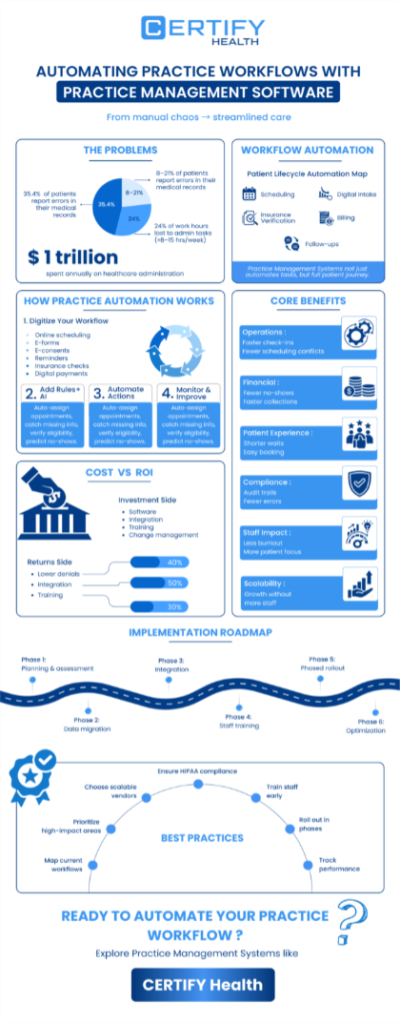
Healthcare administrators spend an average of 15.5 hours every week on administrative tasks that could be automated. Multiply that across teams, and you’re looking at hundreds of lost hours per month, time that could be spent improving patient experience instead of wrestling with manual workflows.
Today’s practice management software is more than just a scheduler or billing tool. It’s the central nervous system of your practice enabling workflow automation across every major function, from patient intake to collections.
This guide breaks down how workflow automation is transforming daily operations, improving efficiency, and optimizing both financial and patient outcomes, plus a realistic look at challenges, best practices, and key success metrics.
What Is Workflow Automation?
In simplest terms, workflow automation refers to the use of technology to streamline routine administrative and clinical processes.
Workflow automation definition: It’s the replacement of repetitive, rule-based manual workflows with software-driven processes that execute tasks consistently, accurately, and often faster than human input.
Think of patient scheduling, check-in, eligibility verification, billing, and recall reminders all handled automatically through your practice management systems, without human intervention.
What is the difference between workflow automation and simple task automation?
Scope and intelligence: Task automation eliminates single actions (like sending reminders). Whereas workflow automation links those actions together in a seamless chain, for example - booking a patient, verifying insurance, generating a bill, and recording follow-up actions.
Software evolution in action
Practice management systems have evolved from rule-based platforms to AI-enabled solutions capable of learning workflows, predicting patient behavior, and adjusting scheduling dynamically. This evolution of software marks the shift from reactive task management to proactive operations optimization.
The scope of automation
Not all tasks can or ought to be automated.
Automated workflows handle structured, repeatable steps; human judgment remains essential for exceptions like diagnostic reviews or complex patient disputes.
FAQ:
Q: Are manual workflows always bad?
A: No, but they’re limited. Manual processes are fine for small practices but collapse under volume, leading to bottlenecks, lost revenue, and burnout.
Key Benefits of Workflow Automation in Practice Management
Practices that embrace automation experience improved efficiency, reduced errors, stronger communication, and measurable gains in productivity and patient satisfaction.
1. Operational Efficiency & Productivity
Workflow automation dramatically reduces time spent on repetitive admin tasks. That’s hours saved every week per staff member.
Not only that, with practice management software, manual errors drop, claim submissions accelerate, and staff can manage 30–40% more workload without overtime.
2. Financial Impact
Let’s connect automation to dollars. Practices that automate billing workflows often see:
- Reduced no-show rates (via auto-reminders and rescheduling prompts)
- Faster payment cycles (thanks to real-time claim validation)
- Higher first-pass claim acceptance (up to 95% in many cases)
All these contribute to long-term financial health; that is a clear cost-benefit analysis framework for decision-makers.
3. Improved Patient Experience
Automation doesn’t just help your team; it also helps your patients. From automated check-in to instant digital receipts, every experience feels smoother. Shorter wait times, fewer form-fill errors, better communication, all contribute to increased patient satisfaction.
4. Staff Retention and Morale
Healthcare employees often cite administrative burdens as a key cause of burnout. Automating repetitive tasks gives your team a space to refocus on what truly matters: patient care. Improved operational efficiency translates into a more engaged workforce.
5. Enhanced Compliance and Accuracy
With automation capabilities like audit trails and standardized documentation, your practice management software ensures regulatory consistency and eliminates missing records. It improves efficiency while simultaneously enhancing security and maintaining compliance.
6. Greater Scalability
As your practice grows from one location to several, or from several to a larger enterprise, Practice Management Software like CERTIFY Health scales right along with you. Workflows stay smooth, consistent, and efficient without requiring a hiring surge.
7. Increased Transparency & Real-Time Visibility
Modern workflow automation doesn’t just streamline tasks, it lets you see what’s happening at every stage.
With real-time dashboards tracking patient flow, task completion, claim status, and bottlenecks, practices gain full visibility into operations. This improves accountability, speeds up decision-making, and helps leaders course-correct before issues escalate.
8. Explicit Error Reduction
Automated workflows eliminate manual data entry mistakes, reduce claim denials, prevent duplicate records, and maintain cleaner, more accurate patient data.
This leads to fewer delays, fewer write-offs, and a more reliable operational foundation.
Real-World Implementation Challenges of Workflow Automation
Despite benefits of workflow automation, implementing workflow automation isn’t that straightforward. It’s a strategic initiative that demands patience, training, and change management.
1. Transition Timelines & Change Management
Deployment of practice management software for workflow automation can take typically 3 to 6 months, depending on your practice and its requirements.
Managing expectations and staff preparation is essential during this period. Clear communication, phased rollouts, and role-specific training minimize disruption.
2. Cognitive Load on Staff
Introducing a new tool automatically can overwhelm the teams. New rules, new screens, and new workflows can increase the mental load on your front desk and clinic staff, who are already juggling multiple tasks.
You need to support your team by organizing micro-training programs, shadow sessions, repeated reinforcement – that’s the key to successful PMS adoption.
3. Legacy System Integration
Most practices run on fragmented tech stacks: a mix of legacy EHRs, billing platforms, and communication tools.
Integrating them seamlessly requires a solid integration strategy built around data sharing and API-based workflows.
4. Data Standardization
In many practices, patient data is inconsistent - different formats, duplicate records, missing fields, or incompatible codes.
Before automation can run smoothly, practices must normalize and standardize data to avoid downstream errors in billing, reporting, or clinical workflows.
5. Data Migration
Moving historical data is often one of the trickiest parts of adopting new software. If anything goes wrong, years of patient or practice information can be affected.
That’s why thorough validation checks, careful backups, and a step-by-step transfer plan are essential to keep your data accurate and safe.
6. Clinical-Tech Alignment
Automation works well only when digital workflows match how clinicians operate. If the rules, templates, or triggers are different from real-world clinical behavior, adoptions become challenging and workarounds multiply.
To make automation stick, workflows must be co-created with providers so the software aligns with actual clinical behavior.
7. Compliance & Privacy Concerns
Introducing automation means handling more patient data digitally. That raises questions about HIPAA compliance, audit trails, consent tracking, access control, and security protocols.
Practices must ensure their automation tools meet regulatory requirements and protect patient information from end to end.
8. Other Common Pitfalls
Skipping testing phases, underestimating training, or failing to map data dependencies can easily derail a practice management software implementation.
Build adequate time into your timeline expectations to avoid these traps and ensure a smoother, more predictable rollout.
Evaluating the Business Case: Understanding Costs, Benefits & ROI
Before moving into implementation, practices need a clear picture of why workflow automation is worth the investment. A structured cost-benefit view helps leaders understand what they’re paying for, where savings will emerge, and how soon the organization will see measurable returns.
This section breaks down the true cost components, expected savings, and how to model ROI realistically so practices can make confident, data-backed decisions.
Cost-Benefit Analysis Framework
Let’s talk about Practice Management Software Investment versus Returns.
Investment components include:
- Software licenses and infrastructure
- Implementation and training costs
- Integration and change management
- Ongoing optimization services
While upfront costs exist, financial metrics like faster revenue recognition and reduced denials often offset them.
Cost reduction areas
Savings typically come from three buckets:
- Labor efficiency: Fewer admin hours required per task.
- Error reduction: Lower claim rejections and fewer corrections.
- Overhead control: Less reliance on external billing or IT support.
Realistic ROI
Most practices using practice management software like CERTIFY Health often see 70% ROI within 6–12 months, though that varies by specialty and scope of automation.
High-volume practices (like urgent care or dental groups) realize faster payback than smaller behavioral health clinics.
Evaluation approach
Use an evaluation approach grounded in both qualitative and quantitative metrics like - time saved, error rates, and patient satisfaction. This ensures your justification resonates with leadership.
Practice Workflow Automation Best Practices
Launching workflow automation successfully requires you to set up a strategy.
1. Assessment phase
Start by mapping current manual workflows.
Identify bottlenecks, repetitive steps, and low-value activities.
Prioritize high-impact automations like scheduling, claims management, and communication templates.
2. Vendor selection criteria
Don’t just chase flashy features when choosing a practice management software. Evaluate practice management software companies by:
- Proven healthcare expertise
- Robust security and compliance measures
- API-based integration flexibility
- Dedicated support during and post-implementation
3. Integration strategy
Plan critical integrations early, especially between your EHR, billing systems, and patient communication platforms.
Include fallback procedures during migration.
4. Staff preparation
Automation can create anxiety. Hold Q&A sessions, provide training, and emphasize how automation strengthens rather than diminishes their job.
5. Phased rollout
Instead of a full deployment, automate one workflow at a time and measure the outcome.
This reduces risk and builds internal advocacy.
6. Ongoing optimization
“Set and forget” is not how workflow automation operates.
Monitor key metrics, gather feedback, and refine configurations regularly.
FAQ:
Q: What’s the biggest mistake practices make when implementing practice management software for workflow automation?
A: Jumping straight to full-scale automation without a roadmap. Start small. Win early. Scale confidently.
Specialty-Specific Opportunities in Workflow Automation
Let’s be honest: no two specialties run the same. And yet, so many practices try to “make do” with generic workflows… until the cracks start showing.
So here’s the reality check:
Dental: Your world runs on progress visits. If intelligent scheduling and automated recalls aren’t doing the heavy lifting, your front desk definitely is.
Dermatology: Referrals, photos, consents, and paperwork parade. Automating those steps instantly frees up your clinical time (and your sanity).
Behavioral Health: You deal with the most sensitive information in healthcare. Tight privacy controls and clean note sync aren’t “nice to have”, they’re survival.
Optometry: High no-show rates? You already know the pain. Automated reminders and confirmations can flip that script fast.
Urgent Care: Your day = chaos. Queue management automation = the difference between “we’re drowning” and “we’ve got this.”
Here’s the punchline: workflow automation only works when it works for your specialty.
Dial it into your world, your pace, your patient flow and that’s where the magic (and the ROI) really happens.
Measuring Success: Key Metrics and Outcomes
Effective workflow automation strategies depend on measurable outcomes.
- Operational metrics: Track time savings, workflow throughput, and automation adoption rate.
- Financial metrics: Measure cost per transaction, days in A/R, and reduction in no-shows.
- Patient metrics: Monitor satisfaction scores, response times, and wait time reductions.
- Staff metrics: Assess task load changes, burnout reduction, and retention improvements.
Establish these baselines before automation rollout. That’s your benchmark for demonstrating success and proving tangible financial impact across your organization.
You also need a platform that actively moves those metrics in the right direction. That’s where CERTIFY Health comes in: it automates check-in, intake, eligibility verification, communication, and payments, reducing manual work while keeping patient engagement smooth and consistent.
And with CERTIFY Pay, practices can even automate collections, simplify payment workflows, and reduce friction for both patients and staff.
Frequently Asked Questions
Q: What’s the long-term operational efficiency gain?
Most practices report up to 25–40% improvement in task completion speed post-automation.
Q: Can automation handle both admin and clinical workflows?
Yes, but prioritize administrative workflows first like billing, scheduling, intake, all of which drive immediate ROI.
Q: How does automation affect patient experience?
Patients value responsiveness. Automated systems enable 24/7 booking, updates, and reminders that are key factors for loyalty and retention.
The Bottom Line
With the right practice management software, healthcare administrators can achieve operational freedom, stronger financial outcomes, and higher patient satisfaction by automating their workflows.
For forward-thinking practices, automation represents not just efficiency but also sustainability.
If you’re ready to modernize your workflows, explore top 10 practice management software platforms now!