BlitZ
BlitZ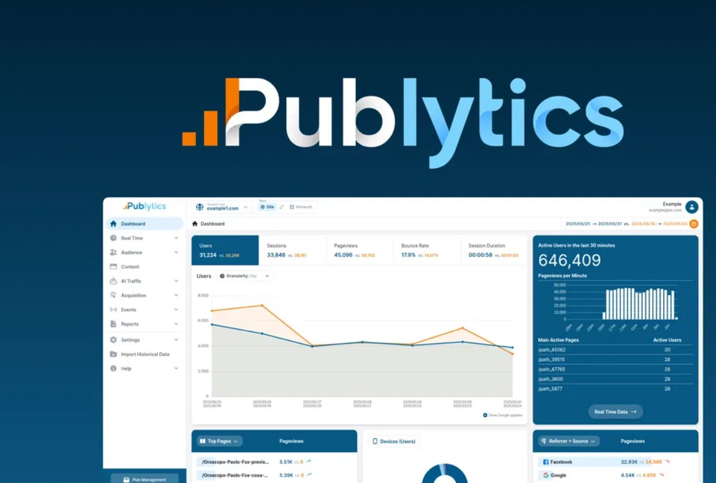
As I said, some analytics tools feel heavy and confusing. Publytics keeps things simple for busy publishers who just want clear traffic data that helps content decisions. The platform shows accurate real-time and historical stats for your sites without data sampling. You see how readers move, what they read, and where they drop off. The tool is privacy friendly, cookieless, and compliant with GDPR, CCPA, and PECR. Data stays on EU servers, which helps with legal rules in many regions. The way I see it, this tool sits between raw analytics and simple dashboards. It focuses on web publishers, newsrooms, and blogs that need fast insight for content and revenue.
Benefits and value:
To cut a long story short, this tool meets clear publisher needs. Key benefits include:
- Clear analytics designed directly for publishers, not generic sites.
- Real-time and historical stats with no data sampling.
- Strong privacy stance with cookieless tracking and EU hosting.
- Less setup pain compared to some legacy tools.
- Better team alignment across editorial, product, and sales.
Publytics Pros and cons:
Pros:
- Focused on publishers, not generic sites.
- Real-time, accurate data with no sampling.
- Strong privacy stance with cookieless tracking and EU hosting.
- Clear author and network reports for multi-site teams.
- AppSumo lifetime tiers give long-term value for growing publishers.
Cons
- Might feel advanced or pricey for very small hobby blogs.
Publytics Monthly pricing:
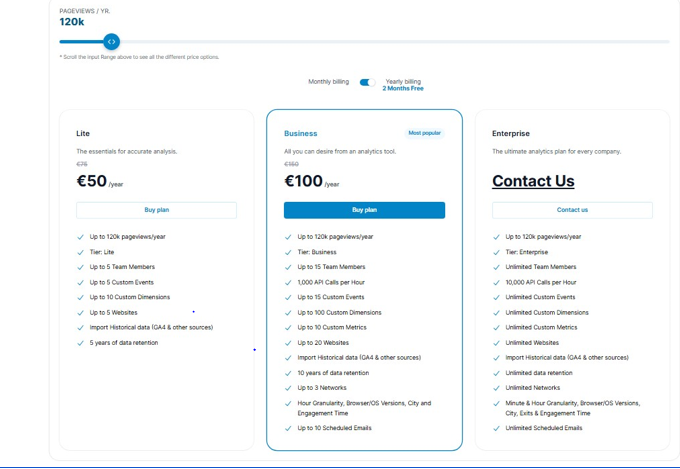
At the present time, the official site lists traffic-based subscription plans. Prices depend on monthly pageviews and selected tier, with contact-based pricing for higher volumes. Lower tiers start around a few euros per month for small sites and scale toward enterprise for large publishers. Plans include team members, custom events, dimensions, multiple websites, and long data retention. Free trials appear on the site, so teams can test before committing. This model fits publishers who prefer predictable recurring budgets instead of one-time deals.
01: Built for web publishers
Guess what, most general analytics platforms ignore daily publisher workflows. Publytics focuses only on web publishers, newsrooms, and content teams, so every screen speaks your language. You see reports shaped around articles, sections, tags, and authors, not just random pageviews. The thing is, this saves time for editors who need answers, not dashboards. You can track content performance, engagement, and revenue-focused metrics in one place. By the way, the interface stays clean, so non-technical writers feel safe clicking around. It cuts out the extra setup work that GA4 often requires for publishers. At the end of the day, the platform becomes a shared hub for data-driven editorial meetings, pitching sessions, and sponsored content planning.
02: Network‑wide analytics
Last week, a friend asked how to manage many sites without chaos. Publytics answers that with network-wide analytics built right into the dashboard. You can switch between single-site and network views, which helps multi-brand media groups. The platform aggregates traffic across sites, so you see total reach, engagement, and growth. I see what you mean if you say multi-site reporting in GA4 feels clunky. Publytics makes cross-site comparisons simple for non-technical teams. You can spot which site carries the network, which niche struggles, and which domain supports key campaigns. This view helps sales teams plan sponsorships across multiple properties and helps editors coordinate content launches.
03: Author‑based reports
To be honest, most writers want one thing. Clear proof that their work performs. Publytics includes author-based reports that tie traffic and engagement directly to each writer. You see pageviews, sessions, and engagement time by author, instead of just per article. That reminds me of old spreadsheets some teams still use to track bylines. Those become unnecessary here. Editors can see who drives loyal readers, who brings search traffic, and which authors shine with social audiences. With this insight, you can plan bonuses, adjust workloads, and support new writers better. Sponsored content managers can track which authors deliver stable results for advertorials.
04: Trending content in real time
You know what, catching trends early makes or breaks newsrooms. Publytics shows trending content in real time, so teams react while interest peaks. The tool highlights articles that gain traffic quickly, which helps editors push them on homepages and social feeds. Breaking news desks see which stories take off and which stall. Come to think of it, this also helps evergreen blogs. They can spot which guides suddenly spike from search or social. On a daily basis, teams can adjust headlines, images, and internal linking around rising stars. The feature gives a live pulse of audience interest across the site network.
05: Google Discover insights
The funny thing is, many publishers see big traffic from Discover but little clarity. Publytics adds Google Discover insights, so you finally see that traffic is clearly grouped. You can track which stories gain Discover visibility, how long they stay there, and how they convert. With these reports, editorial teams adjust formats, topics, and thumbnails that work best with Discover. Speaking of which, SEO and growth teams can test different strategies tailored to Discover audiences. Over time, you identify categories that repeat in Discover and shape content calendars around them. This view sits next to standard search and social metrics, so you see the complete picture.
06: Landing and exit pages
Here’s the thing. A good analytics setup should tell you exactly where readers enter and leave. Publytics offers clear landing and exit page reports that show which pages pull people in and which push them out. You can see first-touch pages from search, social, or newsletters. Then you see where sessions end and where attention drops. This helps identify weak layouts, poor internal links, or confusing content structures. Teams can test different calls to action or related article boxes to hold readers longer. For sponsored pages, you track if readers continue deeper or bounce right away.
07: Long‑term growth charts
As far as I know, many tools focus heavily on short snapshots. Publytics also gives long-term growth charts for deeper trends. You can view multi-year traffic, engagement, and content performance without data sampling. That helps you see which topics still grow, which plateau, and which fade out. Long story short, strategy talks become more grounded. Business owners can match traffic curves with revenue, newsletters, subscriptions, or ad changes. This helps decisions about new verticals, site redesigns, or paywall experiments.
08: Team roles and permissions
I see your point, but data chaos can hurt teams. Publytics tackles this with team roles and permissions. Different team members get the access they need, nothing extra. Editors see content reports, sales teams see traffic and inventory views, and leadership sees global metrics. Just between you and me, this keeps dashboards safe from accidental edits. It also makes onboarding new staff easier because they see only relevant screens. Agencies and external partners can receive limited access for campaigns. All things considered, it supports a cleaner, safer analytics culture in growing teams.
09: Ready‑made and scheduled content reports
Now that you mention it, weekly analytics emails still guide many editorial meetings. Publytics offers ready-made content reports plus scheduled email reports. Teams receive regular digests of top stories, sections, and trends in their inbox. The thing is, not everyone logs into dashboards each day. These emails push insights to people where they already work. Reports can highlight key KPIs like sessions, engagement time, returning visitors, and conversions. Managers can forward these to clients, sponsors, or leadership without manual spreadsheets. This feature supports better communication around performance across editorial, growth, and sales teams.
10: Bot filtering and EU‑based hosting
Let’s put it this way. Dirty data ruins good decisions. Publytics includes bot and spam filtering, which keeps metrics more reliable. Fake hits from bots and crawlers are reduced, so your charts reflect real people. On top of that, the platform is privacy friendly and cookieless, which meets modern tracking rules. Data stays on EU-based servers and complies with GDPR, CCPA, and PECR. Correct me if I’m wrong, but this matters for publishers with European traffic or strict legal teams. It helps you keep user trust and avoid messy consent setups.
Publytics is a strong choice for web publishers who want clear, real-time analytics without the complexity of GA4. The tool delivers accurate data, privacy compliance, and features built for content teams. The AppSumo lifetime deal offers lasting value, especially for growing blogs and media groups. Even with some limits on lower tiers, the price and 60-day money-back guarantee make it a low-risk upgrade. For those focused on editorial insight, multi-site tracking, and privacy, Publytics stands out as a practical, long-term analytics solution.