BlitZ
BlitZ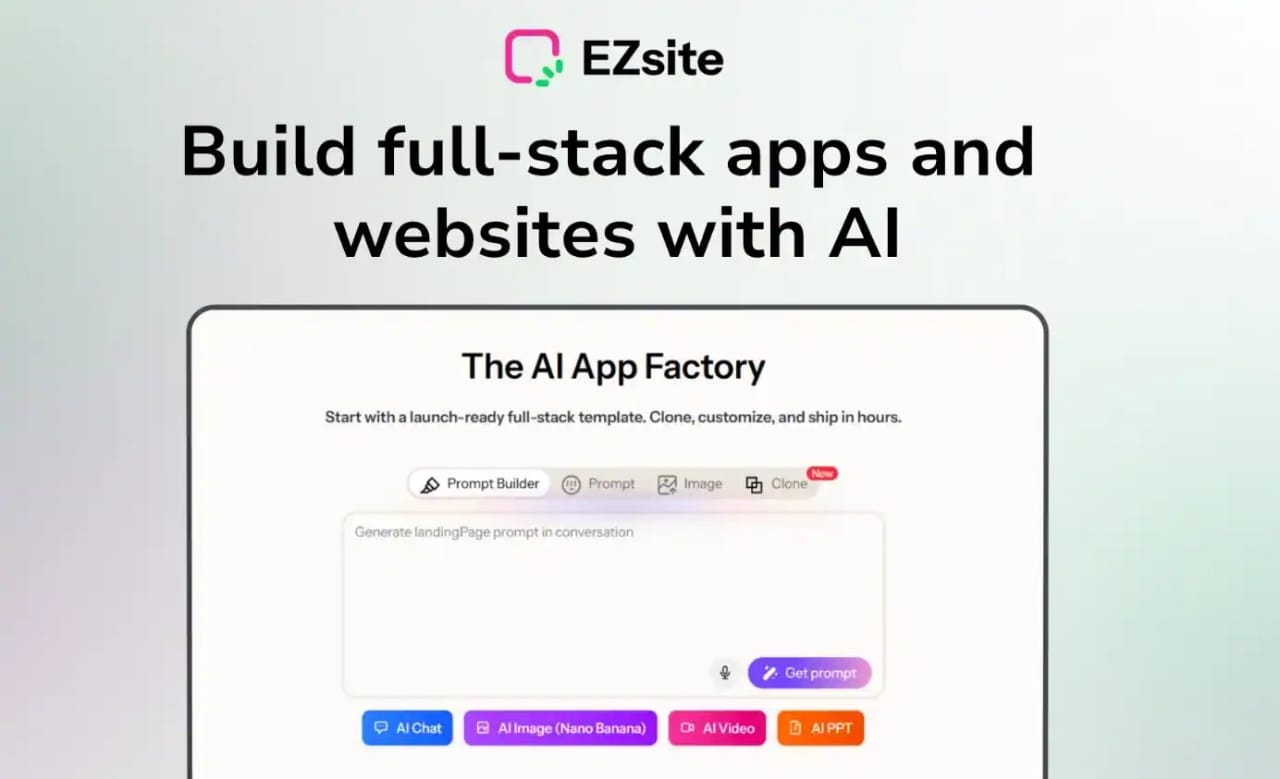
Ezsite is an AI website builder that creates professional sites without coding knowledge. You can build complete websites in about 60 seconds using simple text prompts. The platform uses artificial intelligence to design layouts, write content, and add images automatically. Ezsite goes beyond basic site builders by including database features and customer management tools. It supports both drag-and-drop editing and full code access for advanced users. The platform converts websites into mobile apps with one click. Teams can collaborate on projects in real-time. Custom domains connect easily to your finished sites. Speaking of which, Ezsite handles all hosting automatically after you publish.
Ezsite Pros and Cons:
Pros:
– Creates complete websites in 60 seconds from text
– Includes database and CRM without extra tools
– Converts websites to mobile apps instantly
– Offers both visual editing and full code access
– Automates sales workflows and business processes
Cons:
– Limited customization compared to hand-coded sites
Ezsite Monthly Pricing:
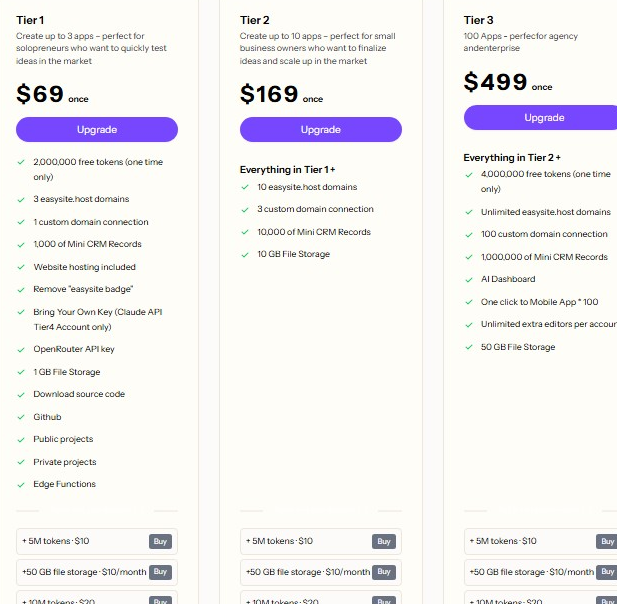
Focus on Agency/Enterprise The EZsite AI Lifetime Deal, Tier 3, is the ultimate package for agencies and enterprises. For a one-time price of $499, gain lifetime access and ship unlimited, revenue-ready apps. This tier includes 100 custom domains, a massive 8 million one-time AI tokens, and storage for 1 million CRM records. You also get 50GB of database storage, 100 mobile app builds, an AI Dashboard, and early access to all future EZsite plan updates, making it a comprehensive, future-proof development solution.
Ezsite Key Features and Capabilities:
01. Text-to-Website Generation
Ezsite builds complete websites from simple text descriptions. You type what you want, and the AI creates it. The system generates multiple pages, navigation menus, and content sections automatically. As I said, this happens in roughly 60 seconds from start to finish. The AI writes a copy that matches your business type. It selects appropriate color schemes and fonts based on your industry. Images get added automatically from stock libraries. The layout adapts to look professional on all screen sizes. You don’t need design skills or technical knowledge. The thing is, traditional website building takes hours or days to complete. Ezsite compresses this timeline dramatically. Business owners save money on designer fees. Startups launch faster than competitors. The generated sites include contact forms and call-to-action buttons. You can edit any element after the initial generation. The AI understands context from your description. It creates relevant page structures for restaurants, agencies, or shops differently.
02. Website Cloning Feature
The URL-to-app function copies existing website designs instantly. You paste any website address into Ezsite. The AI crawls that site and replicates its structure. To be honest, this feature saves enormous amounts of design time. The cloned version becomes fully editable in React or Vue.js format. You can modify colors, text, images, and layouts after cloning. This works great when you see a competitor’s site you admire. The cloned project doesn’t copy content word-for-word to avoid plagiarism issues. Instead, it captures the design framework and component arrangement. Agencies use this to pitch clients quickly. You can show a mockup based on sites they already like. The cloning process takes just minutes to complete. All components remain customizable after the clone finishes. You get access to the underlying code structure. Developers can extend functionality beyond the original site. This bridges the gap between inspiration and implementation.
03. Built-in Mini CRM and Database
Ezsite includes native database functionality without external tools. Contact form submissions save automatically to your dashboard. Lead information gets organized in a mini customer relationship management system. By the way, most website builders require third-party integrations for this capability. The database stores visitor registrations, survey responses, and quote requests. You can view, filter, and export this data anytime. The system tracks when leads submitted information. Follow-up becomes easier with organized contact records. Email addresses, phone numbers, and custom fields all save properly. The database connects to the frontend forms without configuration. Non-technical users manage customer data without learning complex systems. Export functions let you download contacts to spreadsheets. This eliminates monthly fees for separate CRM subscriptions. Small businesses benefit from having everything in one place. The data stays secure on Ezsite’s infrastructure.
04. AI Agent Mode
Agent Mode acts as an autonomous developer for your project. You give complex instructions in plain English. The AI executes multiple edits across different pages simultaneously. Let me share with you how this differs from basic editing tools. Regular editors require manual changes to each element individually. Agent Mode understands instructions like “make the entire site dark themed.” It changes colors, backgrounds, text, and buttons across all pages. You can request adding entire sections like pricing tables or testimonials. The agent writes content, structures the layout, and styles everything appropriately. This saves hours of repetitive editing work. The AI remembers context from previous instructions during a session. You can refine requests if the first result needs adjustment. The feature works best for substantial design changes. Agencies use it to quickly iterate through client feedback. The agent handles technical implementation while you focus on strategy.
05. Integrated AI Chatbots
Every Ezsite website includes AI-powered chatbots automatically. These bots answer visitor questions without human intervention. The chatbot trains on your website content to provide relevant responses. Guess what, this improves customer service availability around the clock. Visitors can ask about products, services, or business hours. The bot captures contact information during conversations. Lead generation happens automatically while you sleep. The chatbot appears as a small widget in the corner of pages. You can customize the greeting message and appearance. The AI understands natural language, not just preset questions. Conversations feel more human than basic scripted bots. The system logs all chats for your review. You can see what questions customers ask most frequently. This provides valuable insights into customer needs. The chatbot reduces the workload on human support teams. Small businesses benefit from enterprise-level customer service features.
06. Voice-to-Vibe-Code Technology
Voice commands replace typing for website creation and editing. You speak your ideas, and the AI translates them into code. The system uses advanced models like Claude and Gemini for accuracy. On the other hand, typing long descriptions can feel tedious and slow. Voice input speeds up the creative process significantly. You can describe design changes while multitasking. The AI understands casual speech patterns and instructions. It converts your words into layouts, content, and functionality. This feature helps users who struggle with writing or typing. The voice recognition works in multiple languages. You can iterate quickly by speaking successive modifications. The system distinguishes between content to add and instructions to execute. For example, saying “add a blue button that says contact us” works correctly. The AI generates the button element with proper styling. This natural interaction removes technical barriers to website building.
07. One-Click Mobile App Conversion
Ezsite converts websites into Android mobile applications instantly. One button transforms your web project into an app. The mobile app maintains all functionality from the website. Users can download your app from the Google Play Store. Now that you mention it, traditional app development costs thousands of dollars. This feature eliminates expensive mobile development teams. The app includes your branding, content, and interactive features. Push notifications can engage users directly on their phones. The conversion process requires no additional coding. Your website updates sync automatically to the mobile app. This expands your audience reach beyond web browsers. Local businesses benefit from having an app presence. Customers find apps more convenient than mobile websites sometimes. The app works offline for certain cached content. Analytics track both website and app usage together.
08. Hybrid Visual and Code Editor
The platform serves both beginners and professional developers simultaneously. A drag-and-drop interface handles quick visual changes. You can move elements, change colors, and swap images visually. At the same time, full code access exists for advanced customization. Developers can edit React components and PostgreSQL databases directly. This flexibility accommodates different skill levels on the same project. Beginners start with visual tools and graduate to code later. The code editor includes syntax highlighting and auto-completion. You can switch between visual and code views instantly. Changes made in either view update the other automatically. This bridges the gap between no-code and pro-code development. Teams with mixed skill levels collaborate more effectively. Agencies can prototype visually, then refine with code. The underlying technology uses modern frameworks like ReactJS. Developers appreciate having full control when needed.
09. Sales and Workflow Automation
Custom AI actions automate business processes without programming. You can trigger actions based on user interactions. For example, form submissions automatically send follow-up emails. Payment processing connects through Stripe integration. Workflow automation links to Zapier for thousands of app connections. All things considered, automation saves time on repetitive business tasks. Lead notifications can alert your sales team immediately. Welcome email sequences start when users register. Abandoned cart reminders can recover lost sales opportunities. The automation editor uses simple trigger-and-action logic. You don’t need to understand webhooks or APIs. The system handles technical implementation behind the scenes. E-commerce functions like order confirmation happen automatically. Subscription management and recurring billing integrate smoothly. This turns your website into an active sales machine.
10. Smart SEO and Analytics Tools
Built-in SEO features optimize content for search engines automatically. The AI suggests improvements to page titles and descriptions. Meta tags get populated correctly without manual entry. Image alt text generated based on content context. Page speed optimization happens during the build process. The platform creates proper heading structures for better rankings. To be fair, many website builders ignore SEO completely. Ezsite treats search optimization as a core feature. The analytics dashboard tracks visitor behavior and traffic sources. You see which pages perform best and where visitors leave. Conversion tracking shows how many visitors become customers. The data updates in real-time without delays. You don’t need to install Google Analytics separately. Heatmaps show where users click most frequently. This information guides design improvements over time. The SEO tools work continuously, not just at launch.
To cut a long story short, Ezsite offers a powerful, easy way to build websites and apps fast without coding. Its AI features save time and effort, while built-in tools like CRM and automation add real business value. The lifetime deal on AppSumo makes it affordable for startups, freelancers, and small businesses. If you want to launch professional sites quickly and manage them easily, Ezsite is worth considering. Just keep in mind it may not replace fully custom development for complex projects.