
 BlitZ
BlitZ
Key Takeaways: The article explains how automated video can help marketing teams scale content by turning existing written assets, like blog posts, FAQs, product pages, and similar materials, into videos without adding a lot more production work. It also explains what video automation software actually does and which platform features matter most, which is probably the most useful part. The main ideas stay practical.
It also looks at how AI video creation helps with scripting, voiceovers, avatars, subtitles, and quick revisions. Along the way, the article goes through a workable process for building a practical workflow, repurposing content for SEO and social distribution, and measuring results with metrics like watch time, conversions, and cost per asset, all of which are generally helpful.
Usually, this works best when teams start with strong source content, follow a simple repeatable process, keep human review in place, and choose tools that fit their actual workflow.
Marketing teams are getting squeezed from all sides. They need more content, more channels, and faster output, while blog posts, landing pages, email campaigns, social clips, product explainers, and SEO content all compete for the same time and attention. Video is usually the biggest bottleneck. It works well, but teams can need a lot of time to plan, script, record, edit, review, and publish it.
With a solid workflow, teams can turn written content into video at scale without taking on a huge production load. Modern video automation software helps marketers reuse blog posts, create social snippets, build product videos, and keep brand messaging consistent in one flow. AI video creation tools also make it easier to add avatars, voiceovers, subtitles, and templates inside a single workflow.
Brands also need to stay visible where audiences already spend time, and search results, social feeds, email, and sales pages all reward strong video. Teams that already publish useful written content can use automated video to get more value from work they’ve already completed.
This guide covers what automated video means and how it fits into a marketing workflow. It also explains which features matter in video automation software, how to repurpose blog content into video, how to optimize for SEO, and how to avoid common mistakes. For teams that want a simpler way to scale content without burning people out, this article helps lay out a practical plan.
Why automated video is becoming a core marketing skill
Video is no longer just a nice extra. For most brands, it’s now a basic part of the content mix. Current 2026 industry data shows 91% of businesses use video as a marketing tool and 72% say video improved lead generation. On the software side, adoption is picking up fast too. G2 reports that 58.7% of video content creation software users are fully live within one day. That says a lot. These tools are now much easier to put in place. Return on investment is another strong sign: 75% of teams see ROI within six months.
Key video marketing and software adoption statistics for 2026
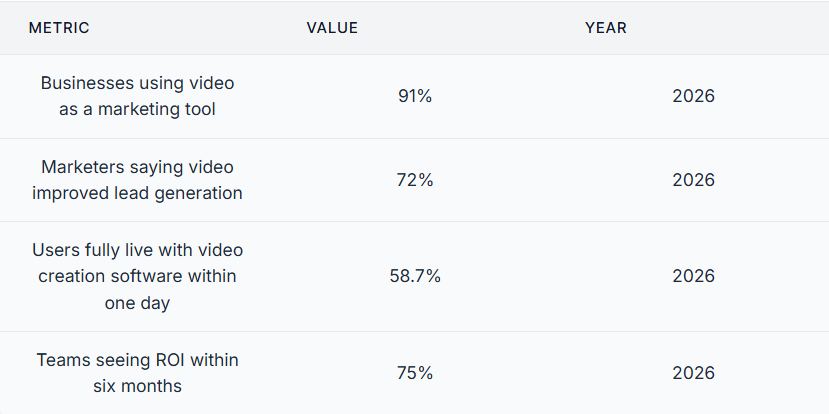
Those numbers help explain why automated video is now a core skill for digital marketers. Teams need a repeatable way to publish video without turning every asset into a full studio project. Automation makes that easier. Marketers don’t have to start from scratch every time. Instead, they can build systems around what they already create. A blog post can become a video draft. A webinar can turn into short clips. A product update can become a voice-led explainer. One source asset, several formats.
For smaller teams, automated video offers a better way to compete. A team doesn’t need a large editing staff to make useful video content anymore. It needs a smart process, clear templates, and tools that cut manual work. Simple, but important. Teams that want to move faster and keep quality steady should start treating automated video as the new baseline.
What automated video software actually does
A lot of teams hear the phrase video automation software and picture a magic button. It doesn’t work like that. Good software doesn’t replace strategy. It removes repetitive production work from your team so they can spend more time on message, offer, audience, and distribution.
On a practical level, video automation software handles five jobs. First, it turns text into a starting script or storyboard. Then it applies templates for layout, brand colors, subtitles, and scene order. Third, it adds audio with text-to-speech, cloned voice options, or uploaded narration. Next, it renders videos in the right size for channels like YouTube, LinkedIn, Instagram, or landing pages. Finally, it helps teams edit, approve, and publish faster.
For marketing teams, that means a cleaner workflow:
Use a blog post, article, product page, FAQ, webinar notes, or even an email.
Processing automated video content
The tool splits content into scenes, summaries, key lines, visuals, and voiceover.
Automated video output
You get a draft video for short-form social, a longer explainer, or a branded talking-head asset.
Ai video creation is useful because it can shorten long text, pull out key points, generate voice tracks, match visuals to each section, and even create synthetic presenters for teams that don’t want to film on camera every time.
If you’re comparing tool types, Text to Video AI vs Blog-to-Video Tools is a helpful read. Not every tool starts with the same type of input. Some work best when you start with a prompt. Others are a better fit when you already have a written asset and need to turn it into a finished marketing video.
AI Filmmaking Workflow: How To Create AI Videos With Full Automation
How ai video creation helps teams repurpose automated video content faster
Most marketing teams already have a content goldmine in blog archives, help centers, case studies, product pages, email sequences, and SEO briefs. That’s not the problem. What slows things down is turning all that material into new formats without doubling the workload.
Instead of asking a writer and editor to rebuild the same idea from scratch, teams can use AI to turn existing text into a first video draft. One long article might become a 90-second summary. A list post can become a scene-by-scene explainer. A how-to guide can turn into a narrated tutorial with chapter breaks much faster.
A simple before-and-after workflow shows the change clearly. Before automation, a team publishes one blog post, then moves on to the next thing, even if that article keeps ranking in search and still has more value to offer. After automation, that same post can become a website video, three social clips, an email embed, and a short sales enablement asset. Same message. More reach from one core topic and more ways to reuse material that’s already strong.
SEO teams benefit too. Search strategy starts with detailed written content, and when teams repurpose those pages into video, brands can improve dwell time, increase on-page engagement, support richer search visibility, and give social teams more to share. For teams that want a closer look at costs and delivery models, AI Video Solutions: Why Credits Are a Bad Deal may also be useful. It gives helpful context and can support better decisions when choosing a production setup that can grow.
The real win is making better use of content a team already paid to create. More video is part of the result. Smarter reuse is what makes the effort worth it.
Building an automated video workflow your team can actually use
A lot of teams miss the mark with automation because they buy the tool first, then try to figure out the workflow. Software matters, sure, but the workflow matters more. That should come first. A good automated video setup should stay simple enough that busy marketers can use it every week without turning the whole thing into a chore.
Start with a content source map. Simple, but important. List the assets the team already makes: blog posts, case studies, newsletters, release notes, webinars, sales decks and support articles. Then decide which ones should become video first. Focus on topics with strong traffic, high conversion value, evergreen usefulness or real social potential.
Next, build a standard production path:
Step 1: Pick one automated video source asset
Choose a page with one main topic and a clear layout. Keep it focused.
Step 2: Turn it into a script outline
Start with the hook. Then add 3 to 5 main points and a clear call to action.
Step 3: Assign a format
Choose whether it should be a short social clip, a blog summary video, a product walkthrough, or a voice-led explainer. Keep it simple.
Step 4: Apply brand rules
Use the same colors, fonts, intro style, voice, and subtitle format every time. Keep things consistent.
Step 5: Review for accuracy
Check claims, product details, pronunciation, timing, and scene flow. Make sure it all matches.
Step 6: Publish and repurpose again
Cut the full video into smaller clips for social, email or paid ads.
A smart workflow should define who owns each stage, because one person may pick the source content, another reviews scripts, a designer approves branding, and a channel owner publishes. Clear ownership keeps automated video from turning into messy handoffs.
Good workflows are boring in a good way. They’re clear, repeatable, and easy to grow.
The features that matter most for automated video platforms
Not all video automation software fits the same team. Some tools are built for creators, while others work better for editors or prompt-based testing. Marketing teams may need something else: repeatable production for business content, strong brand control, and fast output.
The most important features are:
Text-to-video from existing assets
If your team already creates blogs and web copy, the platform should turn that text into scenes fast and easily.
Templates and brand consistency
Reusable layouts save time and cut down on off-brand output. They’re really helpful when several people are making video.
AI avatars and synthetic presenters
Use these when a human-like delivery style matters, but shooting new footage each time takes too much work.
Voice options and voice cloning
Natural voice quality matters more than many teams expect, and poor audio can make even strong ideas fall flat or seem weaker than they are. Voice cloning also helps keep a familiar brand voice across multiple videos.
Subtitles and multilingual support
Captions improve accessibility. They also help social performance, and language support helps teams around the world.
Fast revisions
Marketing content changes a lot. Product details, prices, screenshots, and claims all need updates, sometimes quickly. Editing should stay simple.
Export flexibility
You need output sizes for landscape, square, and vertical placements.
Current 2026 data shows why simple setup matters. According to industry reporting, 78% of marketing teams use AI-generated video in at least one campaign per quarter, and 63% of video marketers used AI tools in 2025, up from 51% in 2024. Teams are picking tools they can start using quickly instead of ones that take months to learn and need a long ramp-up before they make anything useful.
Good software should fit your workflow, not push your team to rebuild everything around one tool. Teams comparing different production approaches can also review examples at Blog2Video Examples to see how existing written content translates into finished video assets.
SEO and distribution: making automated video work harder
Making the video is only half the job. After that, it needs visibility and should create more value from each asset. For SEO specialists and content marketers, automated video should support search performance, not just sit on its own.
Start with a strong page. When a team creates a video from a blog post, it should embed that video on the same page whenever possible. That builds a closer connection between the written content and the media. It also gives users more ways to engage.
Then match titles, descriptions and on-page copy to search intent. If the original article targets a high-value keyword, the video version should stay focused on that same topic. Keep the wording natural. Don’t force keywords into every line. Support the topic through headings, captions, transcript-style summaries and related copy so the page stays clear, helpful and easy to follow.
For social distribution, use layers. One long video can become several short clips, and each one can focus on a single tip, problem or mistake. That creates more reach and gets more use from each production cycle.
Teams should also track a few simple metrics for every automated video:
- Watch time
- Click-through rate
- Engagement rate
- Page conversion rate
- Assisted conversions
- Cost per asset produced
Focus on creating more useful output. When an automated video process supports search, social, email and conversion pages at the same time, teams can measure the return much more easily.
Where synthetic avatars and AI voice fit into automated video work
Some marketers still feel unsure about avatars and voice cloning. Fair enough. Used badly, they can feel stiff or fake, and nobody wants content that feels awkward. Used well, though, they save real time and help teams keep content more consistent.
Synthetic avatars make the most sense when a team needs a presenter-style format but doesn’t want to film every week. They work well for product explainers, onboarding videos, training content, update videos, and localized campaigns. A recognizable digital presenter can also create continuity across a broad mix of assets.
AI voice tools help with a common bottleneck too. Recording voiceover takes time, and when the script changes, re-recording can take even more. With ai video creation tools, teams can update the script and re-render much faster, which gives them more flexibility. That’s especially helpful for fast-moving campaigns, and it also supports SEO content that needs regular updates.
Still, quality control matters. Teams should check the pronunciation of product names, pacing, pauses, and emotional tone before anything goes live. They should also test different voices for different use cases. A polished voice may work best for customer education. For social content, a warmer tone may be a better match.
For teams focused on blog-to-video workflows, tools like Blog2video are relevant because they’re built to turn written content into video content with AI avatars and voice technology. Teams can also explore the blog-to-script tool when building a faster conversion workflow from articles to video-ready scripts. The main strategic point is simple: these features help most when they cut repeated production work and keep the content from feeling generic.
Common mistakes that slow down video automation
Automation saves time only when teams set up the system well. If they don’t, things slow down. A few common mistakes cause poor results and drag the whole process out.
Mistake 1: Automating weak source content
If the blog post feels unclear, the video will too. Start with text that’s useful and well structured. Get it clear first.
Mistake 2: Ignoring channel format
A website explainer, a YouTube video, and a vertical social clip shouldn’t all get the same edit. Different formats need different approaches.
Mistake 3: Overusing AI without human review
AI can draft, summarize, and narrate. Useful, sure. But it shouldn’t replace fact-checking, brand review, or the strategic judgment that still needs a real human eye.
Mistake 4: Forgetting audio quality
People forgive average visuals pretty fast, but robotic sound or bad pacing? Not so much.
Mistake 5: No measurement plan
If the team doesn’t track output, speed, cost and performance, it can’t prove the value of automated video.
Each week, review one video with the team and make troubleshooting a regular habit. Look at what felt strong, what seemed generic, what took too long and what the team could make into a template next time. Small fixes add up quickly. Before long, a shaky workflow feels reliable. It’s easier to manage too.
Frequently Asked Questions
What is automated video creation?
Automated video creation is the process of using software to turn text, media, or templates into video with less manual editing. It often includes script generation, scene building, voiceover, subtitles, formatting, and export. The main goal is to help teams produce more video in less time.
How is ai video creation different from traditional video production?
Traditional production often depends on manual scripting, filming, editing, and revisions. AI video creation speeds up many of those steps by generating drafts, voices, scenes, and presenter-style content automatically. Human review is still important, but the production load becomes much lighter.
What kind of content works best with video automation software?
Structured content works best. That includes blog posts, how-to guides, product pages, FAQs, case studies, and webinar summaries. If the content already has a clear message and sections, it is much easier to convert into strong video.
Can automated video help with SEO?
Yes, especially when it supports a page that already targets search intent. Video can increase engagement, improve content depth, and create more assets for distribution across channels. The best results happen when the video and the written page are aligned around the same topic and audience need.
Is Blog2video a good fit for marketers who want to turn blog posts into video?
It can be a strong fit for teams that already publish written content and want a faster repurposing workflow. Because Blog2video focuses on turning blog-style content into video with AI avatars and voice features, it matches the needs of marketers trying to scale educational and SEO-driven content without building every video from scratch.
Do I need a big team to use video automation software well?
No. Small teams often benefit the most because automation removes repetitive production tasks. With a clear workflow, even a lean content team can create videos from existing articles, publish faster, and keep messaging more consistent.
Final tips for scaling automated video without burning out your team
Automated video doesn’t replace marketers. It cuts the slow, repetitive work that stops good ideas from reaching more people. When teams use video automation software well, they can turn one source asset into a range of useful outputs. That means more reach from blog content, faster campaign support, and better alignment across SEO, social, and email.
The key lessons are simple. Start with strong written content, then build a workflow your team can repeat before buying more tools. Choose ai video creation features that fit how your process really works instead of chasing flashy demos. Keep people involved. That helps protect message quality, brand review, and factual accuracy. Then track the results that matter most: speed, cost, engagement, and conversions.
To put this into practice, start with one high-performing article. Turn it into one automated video, then cut that video into smaller pieces for your main channels. Review the results. Improve the template. Then repeat the process with the next piece.
Marketing teams don’t need endless content. They need systems that help them get more from what they already have. Automated video can support that. Used well, it can help teams turn an existing content library into a steady system for growth at scale.