 Khizar Seo
If you are comparing Tangent Wave vs XPPen Pilot Pro, the real question is simple: do you need a dedicated color grading panel, or a more flexible editing console for everyday creative work? Tangent Wave (Note: It mainly refers to the current Wave2 model) is built for serious color grading, while XPPen Pilot Pro is designed for video editing, photo editing, shortcut control, and broader creative workflows. This comparison looks at their key differences, strengths, limitations, and which type of creator each product fits best.
Tangent Wave vs XPPen Pilot Pro: Specs at a Glance
| Tangent Wave2 | XPPen Pilot Pro Editing Console | |
| Product Type | Color grading control surface | Creative editing console / joystick controller |
| Main Use | Professional color correction and grading | Video editing, photo editing, color adjustment, shortcut control |
| Key Controls | Trackerballs, knobs, buttons, OLED displays | Customizable buttons, all-way joystick, high-speed dials, haptic feedback |
| Best For | Colorists, DITs, grading suites, on-set grading | Video editors, photographers, content creators, hybrid creators |
| Workflow Focus | Color grading depth | Workflow flexibility |
| Setup Style | Compact grading surface for desk or on-set use | Compact one-hand controller |
| User Type | Professional color-focused users | Multi-software creative users |
What Is Tangent Wave2?
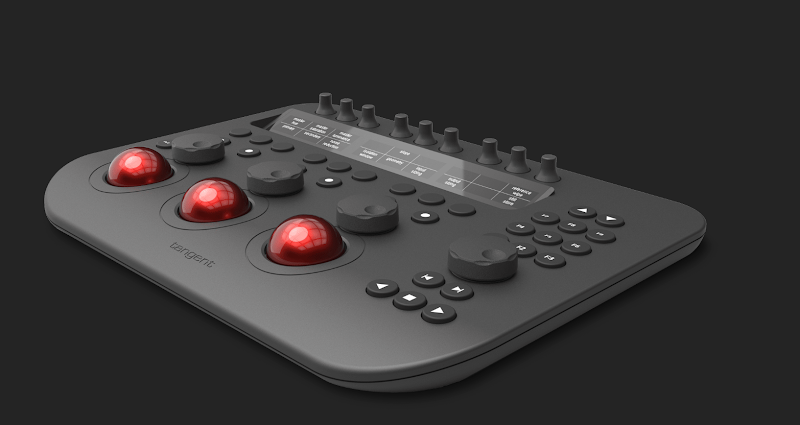
Tangent Wave2 is a professional color grading control surface designed for users who need precise physical control over color correction. It includes trackerballs, knobs, buttons, and OLED displays, making it suitable for colorists, DITs, and post-production environments.
Unlike a general editing console, Tangent Wave2 is built around grading work. Its value comes from giving users a tactile way to adjust color wheels, tonal balance, and grading parameters. It supports several color-correction applications, such as DaVinci Resolve, Adobe Premiere Pro Lumetri, Final Cut Pro X, Baselight, SCRATCH, LiveGrade Pro, and more.
What Problems Does Tangent Wave2 Solve?
Tangent Wave2 mainly solves the problem of slow or imprecise mouse-based color grading. For serious color work, dragging sliders with a mouse can feel inefficient and less intuitive. A dedicated grading panel gives users physical trackerballs and knobs, allowing more natural and precise adjustments.
It is especially useful for:
- Professional color grading
- DaVinci Resolve color workflows
- On-set grading or DIT work
- Film, commercial, broadcast, or documentary color correction
- Users who need physical trackerballs for color wheels
However, not every editor needs Tangent Wave2. If color grading is the center of your work, a dedicated surface can make more sense than a general shortcut controller.
Tangent Wave2 Pros and Cons
Pros
- Dedicated tool for professional color grading
- Physical trackerballs for precise color control
- Knobs and buttons for detailed grading adjustments
- OLED displays help label control functions
- Suitable for serious colorists and post-production users
- Supports many professional color-correction applications
Cons
- More specialized than many creators need
- Higher price and larger setup commitment
- Less useful for general editing, photo editing, or multi-software workflows
What Is XPPen Pilot Pro Editing Console?
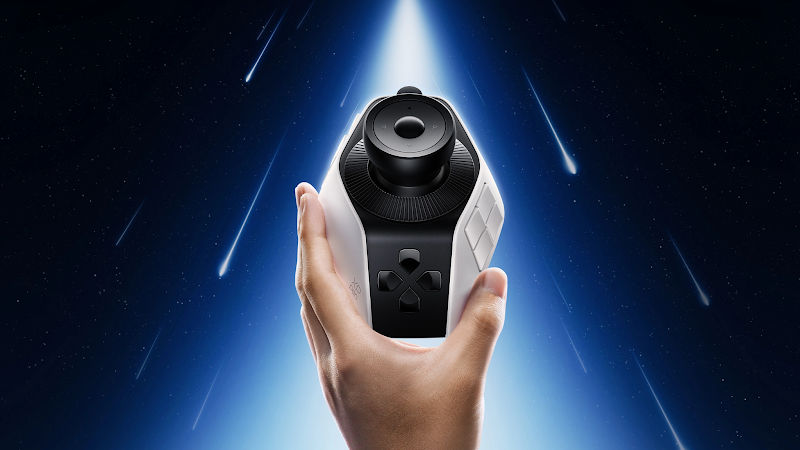
The XPPen Pilot Pro Editing Console is a compact creative controller designed for users who want more physical control over repeated editing actions. It combines customizable buttons, an all-way joystick, high-speed dials, haptic feedback, and one-hand operation.
Unlike Tangent Wave2, Pilot Pro is not a dedicated color grading panel. It is a broader editing console for video editors, photographers, content creators, and hybrid creative users. Its main value is flexibility: users can map controls to timeline navigation, shortcut commands, frame-by-frame editing, zooming, parameter adjustment, and color-related controls across different software.
What Problems Does XPPen Pilot Pro Solve?
XPPen Pilot Pro mainly solves the problem of fragmented creative workflows. Many creators do not only color grade. They edit videos, adjust photos, manage shortcuts, zoom in and out, review frames, and switch between multiple apps.
Pilot Pro can help with:
- Timeline navigation
- Frame-by-frame editing
- Shortcut control
- Photo editing adjustments
- Color-related fine tuning
- Zooming and scrolling
- Multi-software creative workflows
For creators who work across several applications, this matters. A device that only helps in one stage of post-production may be too narrow. Pilot Pro is better understood as a daily creative workflow controller rather than a specialist grading panel.
XPPen Pilot Pro Editing Console Pros and Cons
Pros
- More flexible than a dedicated grading panel
- Compact one-hand design
- Customizable buttons, joystick, and dials
- Useful for video editing, photo editing, and light color adjustment
- Haptic feedback supports more tactile control
- Better fit for hybrid creators and content creators
Cons
- Not a replacement for a professional color grading panel
- Requires customization to get the best results
Which One Should You Choose?
Choose Tangent Wave2 if:
- You are a professional colorist
- You need physical trackerballs for color wheels
- You spend most of your time grading footage
- You work in a color-focused post-production environment
- You want a dedicated color correction control surface
Choose XPPen Pilot Pro Editing Console if:
- You edit videos, photos, and creative content across multiple apps
- You want customizable buttons, dials, and joystick control
- You need help with repeated editing actions
- You want a compact one-hand controller
- You do not need a full professional grading panel
Conclusion
In the Tangent Wave vs XPPen Pilot Pro comparison, Tangent Wave2 is the better choice for professional colorists who need a dedicated grading surface with trackerballs and knobs. XPPen Pilot Pro is the better fit for hybrid creators who want a compact, flexible editing console for video editing, photo editing, light color adjustment, and everyday shortcut control. For most non-specialist creators, Pilot Pro will likely be the more practical option.