Khizar Seo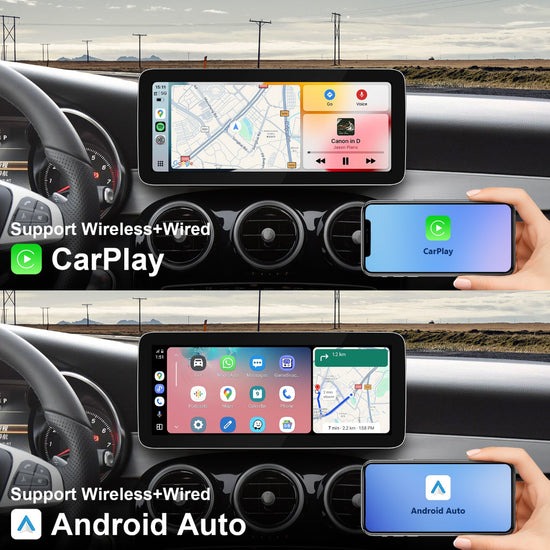
Every time you plug in your iPhone before hitting the road, that cable becomes one more thing to manage tangling around the gear shift, wearing out your charging port, and breaking the flow of what should be a premium driving experience. Mercedes-Benz builds some of the most sophisticated vehicles on the road, yet many models still rely on a wired connection to access Apple CarPlay. It feels like a step backward in a car designed to move forward.
A wireless CarPlay adapter changes that entirely. This compact aftermarket car accessory plugs into your Mercedes’ existing USB port and instantly transforms your multimedia screen into a fully wireless CarPlay hub — no factory modifications, no dealer visits, no compromise. The moment you get in the car, your iPhone connects automatically, putting navigation, music, calls, and messages right on your 12.3-inch screen before you’ve even fastened your seatbelt.
In this article, we’ll cover everything tech-savvy drivers need to know: what wireless CarPlay adapters actually do, which features matter most, how to choose the right one for your Mercedes, and a clear step-by-step installation guide to get you up and running in minutes.
What is a Wireless CarPlay Adapter and Why Your Mercedes Needs One
A wireless CarPlay adapter is a compact plug-and-play device that connects to your Mercedes’ existing USB port and eliminates the need for a physical iPhone cable. Once paired, it communicates with your phone via Wi-Fi and Bluetooth, mirroring the full CarPlay interface directly onto your car’s factory infotainment screen — no rewiring, no dealer appointments, no voided warranty.
The difference from wired CarPlay is immediately noticeable. With a traditional wired setup, you’re threading a cable through the center console every single drive, dealing with fraying connectors, and losing one of your charging ports in the process. A wireless adapter removes all of that friction. Your iPhone detects the car, connects automatically, and CarPlay launches within seconds of you starting the engine.
For Mercedes owners specifically, this matters because the brand’s MBUX infotainment system is already one of the most capable in the industry. Adding wireless CarPlay integration doesn’t fight against that system — it works alongside it, upgrading the multimedia screen experience without touching the factory setup. You keep every Mercedes feature intact while gaining the full Apple ecosystem: turn-by-turn navigation through Maps, Siri voice control, Spotify, podcasts, and hands-free messaging. It’s the kind of seamless, cable-free upgrade that matches the sophistication Mercedes drivers already expect from their vehicle.
Essential Features to Look for in a Wireless CarPlay Adapter
Not all wireless CarPlay adapters are created equal, and for a vehicle as refined as a Mercedes-Benz, the hardware inside the adapter matters just as much as the plug-and-play convenience it promises. Two factors separate genuinely capable adapters from budget options that frustrate more than they help: processing power and screen compatibility.
Processor Power: The Role of Snapdragon 680
The Snapdragon 680 processor has become the benchmark chip for premium wireless CarPlay adapters, and for good reason. CarPlay isn’t a lightweight application — it’s simultaneously managing navigation rendering, audio streaming, Bluetooth communication, and Wi-Fi data transfer in real time. A weaker processor introduces lag between your iPhone and the infotainment display, turning what should be a seamless experience into a frustrating one. The Snapdragon 680 handles all of this without hesitation, delivering near-instant app launches, smooth map scrolling, and uninterrupted audio even when switching between sources. For tech-savvy drivers who expect their accessories to perform at the same level as their vehicle, this chip is the difference between an adapter that works and one that genuinely impresses.
Screen Quality: Maximizing Your 12.3 Inch Multimedia Screen
Mercedes-Benz’s widescreen cockpit display — typically spanning 12.3 inches — deserves an adapter that can fully utilize that real estate. Look for adapters that support full-resolution output without compression artifacts or color distortion. Anti-glare performance is equally critical: sunlight hitting a glossy screen mid-drive makes navigation nearly impossible, so the adapter’s display output should work with your screen’s existing anti-reflective coating rather than undermining it. A quality adapter preserves sharp text, vivid map colors, and crisp interface elements across the entire display. Beyond resolution, responsiveness matters — touch input on a 12.3-inch screen should register immediately, with no perceptible delay between tap and action. These visual and tactile qualities collectively determine whether your upgraded multimedia screen feels like a premium feature or an afterthought.
How to Choose the Right Aftermarket Car Accessories for Your Mercedes
Selecting a wireless CarPlay adapter for your Mercedes isn’t just about finding something that fits the USB port — it’s about finding hardware that respects the vehicle’s engineering and delivers on its promises long-term. Start with compatibility. Not every adapter works seamlessly with MBUX-equipped models, so confirm that the product explicitly lists your Mercedes model year and trim before purchasing. Manufacturers who invest in Mercedes-specific compatibility testing typically document this clearly, and that transparency alone is a reliable quality signal.
Brand reputation carries real weight here. Established names in the aftermarket car accessories space — such as PEMP Car Audio, which focuses specifically on CarPlay solutions — maintain firmware update schedules, which matters more than most buyers realize. Apple periodically updates CarPlay’s protocol, and an adapter without ongoing software support can become obsolete within a year. Customer reviews are equally telling — look beyond star ratings and read for recurring complaints about connection drops, heat buildup, or sluggish performance after iOS updates. These patterns reveal how an adapter holds up under real daily use rather than controlled demo conditions.
Finally, consider how the adapter integrates with your existing setup. A quality device should preserve your Mercedes’ native MBUX functions, Bluetooth audio switching, and steering wheel controls without conflict. Tech-savvy drivers who already use multiple connected devices will also benefit from adapters that support fast automatic reconnection — eliminating the manual pairing step that undermines the entire point of going wireless. Prioritizing these criteria narrows the field quickly and points you toward adapters built to match Mercedes-level expectations.
Step-by-Step Installation and Setup Guide
Pre-Installation Checklist
Before plugging anything in, a quick preparation check saves time and prevents avoidable frustration. Confirm your Mercedes model is CarPlay-compatible — most MBUX-equipped vehicles from 2019 onward support it natively. Update your iPhone to the latest iOS version, since older software can cause pairing failures that look like hardware problems. Locate your car’s USB-A port (typically in the center console or armrest compartment), and have your adapter and its documentation within reach. If your Mercedes has multiple USB ports, identify which one is designated for CarPlay — it’s usually labeled or listed in your owner’s manual. Finally, disable any previously saved wired CarPlay connections in your iPhone’s settings under Settings > General > CarPlay, then delete existing pairings to give the wireless adapter a clean slate for first-time setup.
Connecting and Configuring Your Adapter
With preparation complete, the actual installation takes under five minutes. Start by inserting the wireless CarPlay adapter firmly into the designated USB port — you’ll typically see a status LED illuminate, confirming it has power. Start the engine or switch the ignition to accessory mode to wake the infotainment system fully.
On your iPhone, enable both Bluetooth and Wi-Fi — both are required simultaneously for wireless CarPlay to function. The adapter broadcasts its own Bluetooth signal during first-time setup. Open your iPhone’s Bluetooth settings and select the adapter from the available devices list (the name usually matches the adapter’s brand). Once paired, the adapter automatically creates a dedicated Wi-Fi handshake between your phone and the infotainment unit. Within 15 to 30 seconds, CarPlay should launch on your Mercedes’ multimedia screen automatically.
For configuration, navigate to your MBUX home screen and select the CarPlay icon if it doesn’t launch immediately. From there, arrange your preferred apps using the iPhone’s CarPlay settings under Settings > General > CarPlay > your vehicle name. For troubleshooting connection drops, toggle your iPhone’s Wi-Fi off and back on, or perform a soft reset of the adapter by unplugging it for ten seconds. Persistent issues are often resolved by a firmware update available through the adapter manufacturer’s companion app.
Benefits of Upgrading: Enhanced Driving Experience for Tech-Savvy Drivers
The most immediate benefit drivers notice after going wireless is how naturally the technology disappears into the background. There’s no cable to manage, no port to wear out, and no ritual of plugging in before every drive. CarPlay simply appears on your Mercedes’ multimedia screen the moment you start the engine — and that frictionless experience compounds over thousands of daily commutes into something genuinely valuable.
Safety improves in ways that aren’t always obvious at first. Hands-free calling through Siri, voice-dictated messages, and spoken navigation directions all reduce the temptation to handle your phone while driving. When your 12.3-inch screen is already displaying turn-by-turn directions and your steering wheel controls manage audio without requiring a glance away from the road, the entire cockpit works in your favor rather than against your attention. The anti-glare performance of your Mercedes’ display, combined with a high-resolution CarPlay output, keeps information readable in direct sunlight — exactly when clear navigation matters most.
Long-term value is another consideration worth taking seriously. A quality adapter built on capable hardware like the Snapdragon 680 doesn’t become obsolete when Apple releases a new iOS version — manufacturers who maintain firmware update schedules ensure the device evolves alongside the software it depends on. For tech-savvy drivers who update their iPhones regularly and expect their accessories to keep pace, this ongoing compatibility is what separates a smart purchase from a short-term fix. The result is a Mercedes that feels current, connected, and fully equipped for wherever the road leads next.
Why a Wireless CarPlay Adapter Is the Smartest Mercedes Upgrade
Wireless CarPlay adapters represent one of the most practical upgrades available to Mercedes owners today — and the reasoning is straightforward. A single compact device eliminates cable clutter, automates your iPhone connection, and transforms your factory infotainment system into a fully wireless CarPlay hub without touching a single factory component. The key is choosing hardware built to match your vehicle’s standard: a Snapdragon 680 processor ensures lag-free performance across navigation, audio, and communication, while full-resolution output makes the most of your 12.3-inch multimedia screen’s anti-glare display. Installation takes minutes, not hours, and the result is a driving environment that works with you from the moment the engine starts.
For tech-savvy drivers, this upgrade isn’t about adding a gadget — it’s about closing the gap between what your Mercedes is capable of and what your daily drive actually feels like. The right aftermarket car accessories don’t compromise your vehicle’s sophistication; they extend it. A wireless CarPlay adapter does exactly that, delivering hands-free convenience, enhanced safety, and long-term software compatibility in one seamless package. If you’re ready to leave the cable behind for good, your Mercedes — and your commute — are ready for the upgrade.