Khizar Seo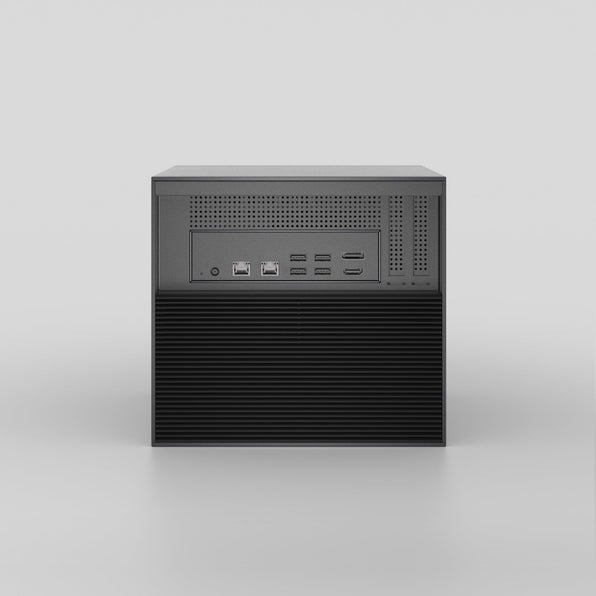
Imagine arriving at your office to discover that a ransomware attack has encrypted your client files, financial records, and years of accumulated business data. For small business owners, this nightmare scenario highlights a critical vulnerability: relying solely on devices or third-party services without adequate control over your information. Home NAS (Network Attached Storage) offers a compelling alternative—a private, secure storage solution that puts you back in command of your data. Unlike cloud services that require ongoing subscriptions and entrust your sensitive information to external providers, a Home NAS system delivers direct control, seamless scalability as your business grows, and long-term cost savings. This article guides small business owners through the essential considerations for evaluating whether Home NAS fits your security needs, implementing robust protective measures, and successfully deploying a system that safeguards your most valuable digital assets while supporting your operational requirements.
Understanding Home NAS and Its Advantages for Small Businesses
A Home NAS (Network Attached Storage) is essentially a dedicated file storage device connected to your local network that multiple users and devices can access simultaneously. Unlike a simple external hard drive that connects to one computer at a time, a NAS operates independently with its own operating system and processor, functioning as a private server within your office. For small business owners, this translates into several critical advantages. First, you gain enhanced data security through physical control—your files remain on-premises rather than stored on distant servers managed by strangers. Second, centralized access means your team can retrieve documents, collaborate on projects, and backup workstations from any authorized device without emailing files or juggling USB drives. Third, scalability becomes straightforward as your business expands; most NAS systems allow you to add storage capacity by inserting additional drives without replacing the entire unit. Finally, the cost-effectiveness becomes apparent over time—after the initial hardware investment, you eliminate recurring monthly subscription fees that cloud services demand year after year. This combination of security, convenience, flexibility, and financial efficiency makes Home NAS particularly valuable for small businesses handling sensitive client information, financial records, or proprietary data that requires reliable protection and instant availability.
Home NAS vs. Cloud Storage Solutions: A Comparative Analysis
When evaluating storage options, small business owners face a fundamental choice between Home NAS and cloud storage services, each presenting distinct trade-offs. Cloud storage operates on subscription models with monthly or annual fees that accumulate significantly over years, whereas Home NAS requires a substantial upfront hardware investment but minimal ongoing costs beyond electricity and occasional drive replacements. Control represents another critical distinction—cloud services entrust your data to third-party providers subject to their terms, potential outages, and privacy policies, while Home NAS keeps everything on-premises under your direct supervision. Security dynamics differ considerably: cloud providers offer professional-grade infrastructure but create attractive targets for hackers and require trusting external entities with sensitive information, whereas Home NAS places security responsibility on you but eliminates third-party access risks. Accessibility also varies—cloud services provide convenient access from anywhere with internet connectivity, while Home NAS typically requires additional configuration for secure remote access but delivers faster local network speeds. Home NAS proves particularly advantageous for businesses handling confidential client records, proprietary designs, or financial data requiring strict control, those experiencing rapid data growth where cloud storage costs escalate quickly, and operations prioritizing data sovereignty and independence from service provider decisions. Businesses with reliable internet connections, distributed teams requiring constant remote access, or limited technical expertise might find cloud solutions more practical despite their ongoing expenses.
Ensuring Robust Network Security for Your Home NAS
Network security forms the foundation of any Home NAS deployment, as even the most sophisticated storage system becomes vulnerable without proper protective measures. Small business owners must recognize that storing data locally doesn’t automatically guarantee security—deliberate safeguards are essential. Begin by enabling strong encryption for all stored data and network transmissions, ensuring that intercepted information remains unreadable to unauthorized parties. Regular firmware updates address newly discovered vulnerabilities, so configure your NAS to check for patches weekly and apply them promptly. Firewall configuration deserves careful attention: disable unnecessary services, restrict access to specific IP addresses when possible, and close unused ports that attackers might exploit. For remote access, avoid simple port forwarding and instead implement VPN connections that create encrypted tunnels between remote devices and your office network. Common threats include brute-force password attacks, ransomware infiltration through compromised credentials, and outdated software vulnerabilities. Mitigate these risks by enforcing complex passwords with regular rotation schedules, implementing two-factor authentication for all user accounts, and maintaining offline backup copies stored separately from your primary NAS. Consider network segmentation to isolate your NAS from guest Wi-Fi or less secure devices, reducing potential attack vectors. Small businesses handling client information should also review compliance requirements for data protection regulations applicable to their industry, as proper NAS security helps satisfy legal obligations while protecting your reputation and client trust.
Essential Security Practices
Implementing comprehensive security requires systematic attention to authentication, backups, and monitoring. Configure user authentication by creating individual accounts for each team member rather than sharing credentials, assigning permissions based on actual job requirements so employees access only necessary files. Enable account lockout policies that temporarily disable accounts after several failed login attempts, thwarting automated password-guessing attacks. Establish a disciplined backup routine with the 3-2-1 rule: maintain three copies of critical data on two different storage types, with one copy stored off-site or offline. Schedule automated daily backups during off-hours, verify backup integrity monthly by testing file restoration, and document your recovery procedures so any team member can restore data during emergencies. Monitor system logs regularly by reviewing access records weekly for unusual activity patterns, such as login attempts from unfamiliar locations or access during odd hours. Configure your NAS to send email alerts for critical events like failed login attempts, storage capacity warnings, or system errors requiring immediate attention. Document all security configurations and update this documentation whenever you modify settings, ensuring continuity if you’re unavailable during a security incident. These practices transform your Home NAS from a simple storage device into a professionally secured business asset.
Building and Integrating: Single-Board Computers and Home Automation
Single-board computers like Raspberry Pi offer small business owners a remarkably affordable entry point into Home NAS systems without sacrificing functionality. These compact devices pack a complete computer—processor, memory, storage interfaces, and networking—onto a circuit board smaller than a deck of cards, typically costing a fraction of commercial NAS units. For businesses operating on tight budgets or testing NAS concepts before larger investments, single-board solutions provide genuine capability. Beyond basic storage, these versatile platforms enable integration with home automation systems, creating streamlined workflows that enhance operational efficiency. Imagine automated backups triggered when you lock your office smart door, or security cameras storing footage directly to your NAS when motion sensors activate. Such integrations transform your storage system from passive repository into an active component of your business infrastructure, reducing manual tasks and ensuring critical processes occur reliably without constant supervision.
Using Single-Board Computers for Cost-Effective NAS
Building a single-board computer NAS requires selecting appropriate hardware and following systematic configuration steps. Popular models include Raspberry Pi 4 with its USB 3.0 ports for faster drive connections, ODROID-HC4 designed specifically for NAS applications with dual SATA interfaces, and Rock Pi 4 offering balanced performance and connectivity. Essential components beyond the board itself include a quality power supply rated for continuous operation, external hard drives or SSDs connected via USB or SATA depending on your board’s capabilities, a microSD card for the operating system, and an Ethernet cable for reliable network connection. Initial configuration begins by installing specialized NAS software like OpenMediaVault, which provides a web-based interface for managing storage, users, and services without command-line expertise. After flashing the software to your microSD card and booting the system, access the web interface from any browser on your network to configure storage pools, create shared folders, and establish user permissions. While single-board NAS systems offer tremendous value, recognize their limitations—they typically handle fewer simultaneous users than commercial units and may struggle with processor-intensive tasks like real-time video transcoding, making them ideal for small teams with straightforward storage needs rather than demanding multimedia workflows.
Home Automation Integration Strategies
Integrating your Home NAS with IoT devices and automation platforms creates powerful synergies that enhance business efficiency and data security. Connect security cameras to store footage directly on your NAS rather than expensive cloud subscriptions, ensuring you control surveillance data while avoiding monthly fees. Configure smart lighting systems to indicate backup status—green when successful, red when failures require attention—providing instant visual confirmation without checking logs. Link environmental sensors to trigger automated responses: temperature monitors can send alerts if your equipment room overheats, potentially preventing hardware damage before it occurs. Implement automated workflows using platforms like Home Assistant or Node-RED that run directly on your NAS or companion single-board computer. Create routines where closing your smart lock after business hours automatically initiates full system backups, or motion sensors in restricted areas trigger immediate video recording with timestamp logs. These integrations deliver tangible benefits beyond convenience—automated backups eliminate the risk of forgotten manual procedures, immediate alerts enable rapid responses to security events, and centralized control through a single interface reduces the complexity of managing multiple systems. For small businesses, this consolidation means spending less time on technical maintenance and more time focused on core operations, while maintaining robust data protection and operational oversight.
Practical Implementation: Step-by-Step Guide to Setting Up Your Home NAS
Successfully deploying a Home NAS requires methodical planning and execution to ensure your system meets business requirements while maintaining security and reliability. This practical guide walks you through the entire process from initial assessment to operational deployment, providing actionable steps that demystify what might initially seem technically daunting.
Step-by-Step Setup Process
Begin the preparation phase by assessing your storage requirements—calculate current data volume, estimate annual growth based on business trends, and identify which files require immediate access versus archival storage. Document your team’s access patterns: how many users need simultaneous connections, whether remote access is essential, and which departments require shared folders. Select hardware matching these needs, choosing between pre-built NAS units offering simplicity and warranty support, or single-board solutions providing cost savings with modest technical demands. When evaluating commercial options, manufacturers like Zima offer specialized network-attached storage devices designed for small business environments, balancing user-friendly interfaces with professional features. Purchase drives with appropriate capacity, preferring NAS-rated models designed for continuous operation rather than standard desktop drives prone to premature failure under constant use. During the installation phase, position your NAS in a climate-controlled location with adequate ventilation, connect it directly to your router via Ethernet for maximum speed and reliability, and power it through an uninterruptible power supply protecting against electrical surges and outages. Follow manufacturer instructions to initialize the system, typically accessing a web interface to format drives, create storage pools with appropriate RAID configurations for redundancy, and install the latest firmware before proceeding. The configuration phase demands careful attention to security: create individual user accounts with strong passwords, enable two-factor authentication, configure firewall rules restricting access to necessary ports only, and establish automated backup schedules copying critical data to external drives or secondary locations. Test thoroughly by transferring sample files from multiple devices, verifying permissions work correctly, simulating remote access if required, and practicing data restoration from backups to confirm recovery procedures function properly. Optimization involves monitoring performance during the first weeks, adjusting settings based on actual usage patterns, documenting configurations and procedures for future reference, and scheduling regular maintenance tasks like quarterly drive health checks and semi-annual security audits. Common troubleshooting scenarios include connection failures often resolved by checking network cables and router settings, slow performance typically improved by reducing simultaneous connections or upgrading network infrastructure, and access permission errors usually fixed by reviewing user group assignments and folder sharing configurations.
Taking Control of Your Business Data Security
Home NAS represents a powerful solution for small business owners seeking secure, scalable storage that maintains control over sensitive data without the perpetual costs and third-party dependencies of cloud services. Throughout this guide, we’ve explored how these systems deliver tangible advantages—physical control over your information, centralized access for team collaboration, straightforward scalability as your business expands, and long-term financial savings that compound over years. Robust network security remains non-negotiable, requiring disciplined implementation of encryption, authentication protocols, regular updates, and comprehensive backup strategies that protect against both external threats and internal mishaps. Single-board computers and home automation integration extend these benefits further, offering budget-conscious entry points and operational efficiencies that transform storage from passive repository into active business infrastructure. Whether you choose a commercial NAS unit for turnkey simplicity or build a custom solution with single-board hardware, the fundamental principle remains consistent: taking ownership of your data security positions your business for sustainable growth while safeguarding your most valuable digital assets. Assess your current storage vulnerabilities, calculate the true cost of your existing solutions, and take the first step toward implementing a Home NAS system that serves your business today while adapting to tomorrow’s demands.