IQnewswire
A few years ago, AI was mostly known for chatbots and writing tools. Today, it has quietly become part of almost every creative workflow, from generating images and videos to building spreadsheets and reports. One area where AI has made a real difference is presentations.
Presentations are no longer just a set of slides. They are how founders pitch investors, how sales teams close deals, how managers explain strategy, and how marketers tell stories. And in most cases, the quality of a presentation directly affects the outcome.
That is why AI presentation makers have become so popular. They promise faster creation, better design, and less manual work. But after testing many of these tools, one thing becomes clear very quickly: not all AI presentation tools are built for real professional work.
Some tools look impressive at first, but fall apart once you start editing. Others generate beautiful slides, but give you very little control. A few are fast, but their output feels generic.
So I decided to properly test the most popular AI presentation makers available today and see which ones actually hold up in real-world use.
I focused on three things:
- How good the slides look from the first draft
- How easy it is to edit and refine them
- How easy it is to take my existing powerpoint presentations, beautify them and export them again
Below are the tools that performed the best in real workflows, not just in demos.
Best AI Presentation Makers Compared
| AI Presentation Maker | Best Suited For | Strengths | Limitations | Pricing |
| Alai | High-quality professional presentations | Multiple slide options, responsive canvas, context-aware editing, Nano Banana Pro support | Newer platform | Free plan, Paid from $20/month |
| Gamma AI | Fast multi-format documents | One-prompt deck generation, can convert to landing pages | Limited control for complex decks, basic design for presentations | Free, Paid from $10/month |
| Beautiful.ai | Team presentations | Smart layouts, fast deck creation | Limited customization | Paid from $12/month (billed annually) |
| Canva | Beginners and designers | Templates, AI design tools | Template-heavy output | Paid from $12.99/month |
| Google Slides (Nano Banana) | Google ecosystem | Easy to collaborate with the team | Can create 1 slide at a time with AI, no way to iterate on slides | Paid from $26.99/month |
| PowerPoint Copilot | Office users | Deep Office integration | Generic design | Paid from $9.99/month |
| Claude | Content-first decks | Accurate text generation | Basic visuals | Paid from $20/month |
1. Alai — Best AI Presentation Maker for High-Quality Professional Slides
After testing all the tools, Alai clearly stands out as the most complete AI presentation maker for professional use.
Most AI presentation tools focus on one thing: generating slides quickly. Alai takes a very different approach. It is built as a full presentation system, not just a slide generator.
Instead of giving you one auto-generated slide and asking you to fix it, Alai gives you four different slide options for every idea. This is a big deal in real workflows. It allows you to compare layouts, structure, and visual direction before committing to a slide. It feels more like working with a design assistant than using a template.
The second thing that makes Alai special is its responsive canvas. In most tools, the moment you edit text or move elements around, the layout starts to break. Spacing gets messy. Alignment goes off. You end up fixing design instead of working on your message.
With Alai, the layout adapts automatically as you edit. You can rewrite text, add visuals, reorder sections, and the slide adjusts on its own. You never have to worry about resizing or realigning anything.
Alai also uses context-aware AI, which means it understands your full presentation, not just one slide. When you rewrite a section, split a slide, or merge ideas, it keeps the rest of the deck consistent. This is extremely important for professional presentations that go through multiple rounds of feedback.
Another strong point is Alai’s support for Nano Banana Pro image slides. You can generate image-based slides directly inside the same system, refine them using presets and annotations, and mix them with regular content slides. There is no need to jump between different tools. Image slides work great when you want to create a visualization or create a fancy design.
This makes Alai ideal for teams that want to combine visual storytelling with structured business content.
Why Alai Ranks #1
- You get four slide options for every idea, not just one
- The canvas adapts automatically when content changes
- The AI understands your whole deck, not just one slide
- You can create and edit Nano Banana Pro image slides in the same tool
- You keep full creative control with AI assistance
- You can generate AI images using different AI models right inside the system
- You can import and export PowerPoint and PDF files
- There is API support for repeatable presentation workflows
Best Suited For
- Pitch decks and investor presentations
- Sales and marketing decks
- Strategy and planning presentations
- Training and education material
- Brand-consistent team presentations
Pros
- Slides look premium from the first draft
- Editing never breaks the layout
- Works equally well for image slides and content slides
- Built for real professional workflows
Cons
- Still a newer platform compared to older legacy tools
Verdict
If you care about presentation quality and not just speed, Alai is the best AI presentation maker available right now. It is built for people who create presentations regularly and need a system that holds up over time.

2. Gamma — Best for Fast, Multi-format Slide Decks
Gamma is one of those tools that immediately impresses you when you use it for the first time.
If your goal is to create a document that can work as a webpage or presentation in just a few minutes, Gamma does that extremely well. The workflow is very simple. You paste your text, upload a document, or write a short prompt, and Gamma builds a complete slide deck for you.
The slides look clean and well-balanced. You do not get heavy, old-school PowerPoint designs. Its easy to add elements or edit text. That is why Gamma is very popular among startup founders, product teams, and marketers who need to create decks quickly.
Another strong point of Gamma is that it can pull information from the web and generate AI images for your slides. This is useful when you are building explainers, pitch decks, or presentations that need visuals without spending time searching for images.
Where Gamma really shines is speed. You can go from idea to presentation in minutes.
One of main cons of Gamma is that the designs look flat and basic. It uses notion-like building blocks and so the slides don’t look designer quality. Gamma AI only offers surface level customization and so you have very limited control over spacing, layouts and element design. This leads to slides looking flat and not high quality.
Gamma is great for fast, multi-format documents. It is not built for high quality decks that look like a professional designer created them
Why Gamma Ranks #2
- Very fast presentation generation
- Multi-format support, can convert presentation to webpage
- Works well for one-prompt decks
- Supports AI images and web research
- Easy export to PowerPoint and PDF
Best Suited For
- Memos
- Product explainers
- Internal team updates
- Quick investor/client updates
Pros
- Slides can be converted to other formats
- Very easy to use
- Good for quick turnarounds
Cons
- Limited layout control
- Design looks basic
- Import/export existing powerpoint doesn’t work reliably
Verdict
Gamma is an acceptable option if you care about speed and presenting in multiple formats. It is perfect for quick presentations/webpages. For long-term, evolving decks, it may feel limiting.

3. Beautiful.ai — Best for Fast Team Presentations
Beautiful.ai is built for one very specific purpose: helping teams create clean, professional presentations as fast as possible.
The platform is based on smart slide layouts. You choose a slide type, add your content, and the layout adjusts automatically. You do not need to think about spacing, alignment, or design rules. Everything stays clean and consistent by default.
This makes Beautiful.ai a favorite among sales teams, marketing teams, and business users who create similar types of decks again and again. Revenue reviews, sales pitches, marketing updates, and performance reports all fit very well into Beautiful.ai’s workflow.
The AI can generate a full deck from a prompt, and you can refine it using predefined layouts for charts, timelines, comparisons, and frameworks.
The big advantage of Beautiful.ai is consistency. Slides always look professional. Branding is easy to apply. Teams can move fast without breaking design rules.
The limitation is flexibility.
Because everything is based on predefined layouts, you cannot freely experiment with structure or create completely custom slide designs. If your presentation needs a unique storytelling flow, you may feel constrained.
Why Beautiful.ai Ranks #3
- Smart auto-layout system
- Very fast deck creation
- Strong team workflows
- Clean and consistent design
Best Suited For
- Sales decks
- Revenue reviews
- Marketing updates
- Business presentations
Pros
- Slides always look professional
- Very fast to build decks
- No design skills required
- Great for teams
Cons
- Limited creative freedom
- Designs can start to feel repetitive
- Not ideal for custom storytelling
Verdict
Beautiful.ai is a strong AI presentation maker for business teams that want speed and consistency. If your presentations follow standard formats, it works very well. For more creative or complex storytelling, it can feel restrictive.
4. Canva — Best for Beginners and Designers
Canva is a very different type of tool compared to Gamma and Beautiful.ai.
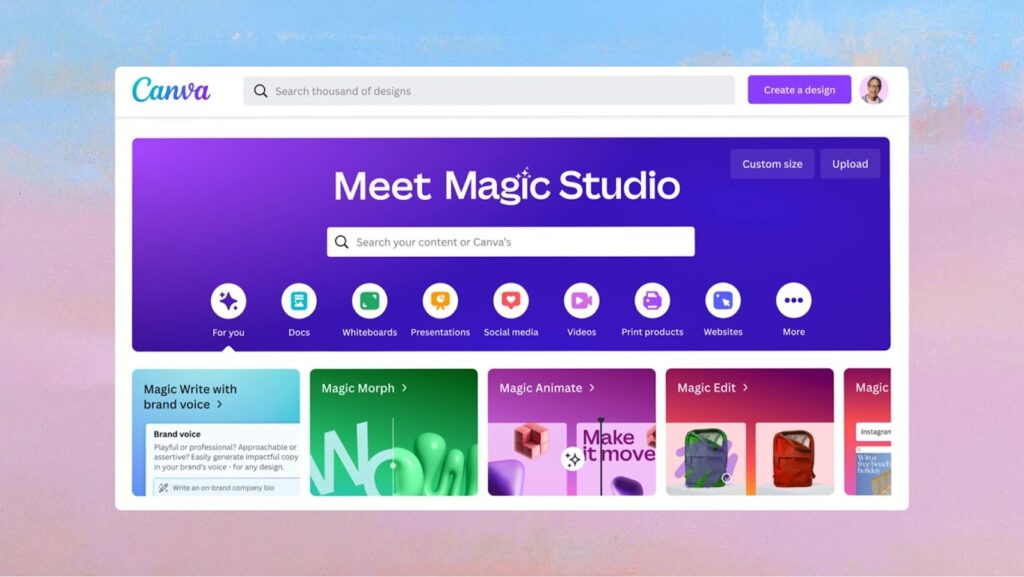
It is not just an AI presentation maker. It is a full design platform that includes presentations, social media graphics, videos, documents, and much more. That is why Canva is so popular with beginners and creative users.
With Canva, you can generate slides using AI, choose from thousands of templates, and then customize everything manually. You can change layouts, replace images, add animations, and use Canva’s massive design library.
If you enjoy designing and want full visual freedom, Canva gives you that.
The strength of Canva is flexibility. The weakness is consistency. Since its a free canvas system, its hard for beginners to create new layouts and fix alignments, spacing etc manually. The layouts break as the content evolves unlike other responsive canvas systems.
Because Canva is template-based, many presentations end up looking similar. Without strong design discipline, slides can feel generic. For professional teams that need strict brand control and long-term consistency, this can become a problem.
Canva is excellent for creative work. It is not built specifically for professional presentation workflows where decks are reused and refined over time.
Why Canva Ranks #4
- Huge template library
- Powerful design tools
- AI-assisted slide generation
- Great for creative users
Best Suited For
- Beginners
- Designers
- Social media and marketing teams
- Creative presentations
Pros
- Very flexible design environment
- Easy to use
- Massive asset library
- Many AI tools in one platform
Cons
- Template-heavy output
- Brand consistency requires manual effort
- Not designed for long-term professional workflows
Verdict
Canva is a great AI presentation maker for beginners and designers who want creative freedom. For professional teams that need structured, consistent presentations, it requires more manual work.
5. Google Slides with Nano Banana — Best for collaboration & integrations
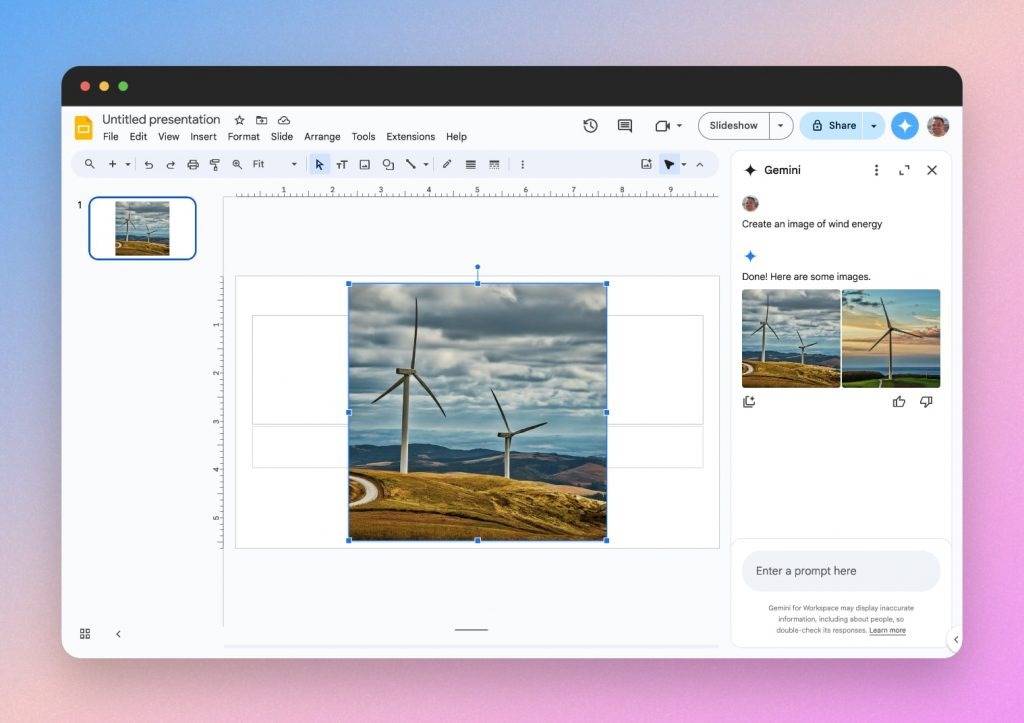
Google Slides has recently integrated Nano Banana Pro into Google slides.
With the introduction of Google’s Nano Banana image model, Google Slides can now generate image slides even improve existing slides automatically.
What makes Google Slides special is that it does all of this inside a tool that millions of people already use. There is no new software to learn. No new workflow to adopt. If you use Google Docs and Google Slides, you can start using AI presentations instantly.
You simply open Google Slides, click the Nano Banana icon, and describe what kind of slide you want. The AI generates a single slide at a time.
One of the most useful features is the ability to improve existing presentations. If you already have slides, you can use AI to make them beautiful. Google slides does this by converting the slide into a Nano banana pro image.
However, currently google slides can only generate 1 slide at a time and does not allow any easy way to iterate on top of image slides. For example, you cannot select text or icons on these image slides and tell the AI to exactly change those (similar to how you can do on tools like Alai). Since it can only generate 1 slide at a time, it does not maintain narrative consistency with the rest of the deck.
If you’re already paying for the Google suite then Google Slides offers a very practical way to use AI without paying for another tool.
Why Google Slides Ranks #5
- Nano Banana image and infographic creation
- Improve existing slides by converting them to an image
- Works directly inside Google Slides
Best Suited For
- Students and teachers
- Freelancers
- Small businesses
- Quick presentations
Pros
- Integrated inside Google’s ecosystem
- Very easy to get started
- Strong image slide generation
- Good for upgrading old slides
Cons
- Can only generate 1 slide at a time
- No way to iterate on AI generated image slides
- Still need to pixel tweak regular slides as the canvas does not automatically adjust spacing, alignment etc
- Not built for professional presentation workflows
Verdict
Google Slides is good if you’re already paying for the Google ecosystem and want to update 1 or 2 slides in an existing presentation. It is easy to collaborate with your team and use other tools in the subscription. For professional teams and long-term presentation projects, it lacks the depth and control of dedicated AI presentation platforms.

6. Microsoft PowerPoint with Copilot — Best for Office Users
PowerPoint is still the most widely used presentation tool in the world. With Copilot, Microsoft has added AI-powered slide creation directly inside PowerPoint itself.
If your company already uses Microsoft Office, Copilot feels like a natural upgrade. You do not need to change tools or learn a new platform. Everything happens inside PowerPoint.
You click “Create with Copilot,” describe your presentation, and Copilot generates an outline first. Then it builds a full slide deck with text, images, charts, and structure. You can also upload documents so Copilot can use your real content.
This makes Copilot very useful for business users who create reports, strategy decks, internal updates, and executive presentations.
Where Copilot is strong is structure and workflow. Where it falls short is design.
The slides look professional, but not modern. They feel safe and corporate. You do not get the fresh, visual style that tools like Alai offer. There is no way to iterate on existing slides with AI. Moreover Microsoft is just fitting content into a small library of templates instead of creating the best layout for content.
You also need a Microsoft 365 Copilot subscription, which adds cost.
Why PowerPoint Copilot Ranks #6
- Built directly into PowerPoint
- Strong for business workflows
- Uses your existing documents
- Easy for enterprise teams
Best Suited For
- Corporate teams
- Enterprise users
- Office 365 companies
- Business reporting
Pros
- No need to change tools
- Deep Office integration
- Strong document support
- Good for structured business decks
Cons
- Slide design feels generic
- Requires paid Copilot plan
- Not focused on modern visuals
- No way to iterate on existing slides
- Fits content into basic predefined templates instead of creating new layouts for the given content
Verdict
PowerPoint with Copilot is a solid AI presentation maker for companies already using Microsoft Office. It is great for reports and internal decks, but not ideal for modern, design-driven presentations.
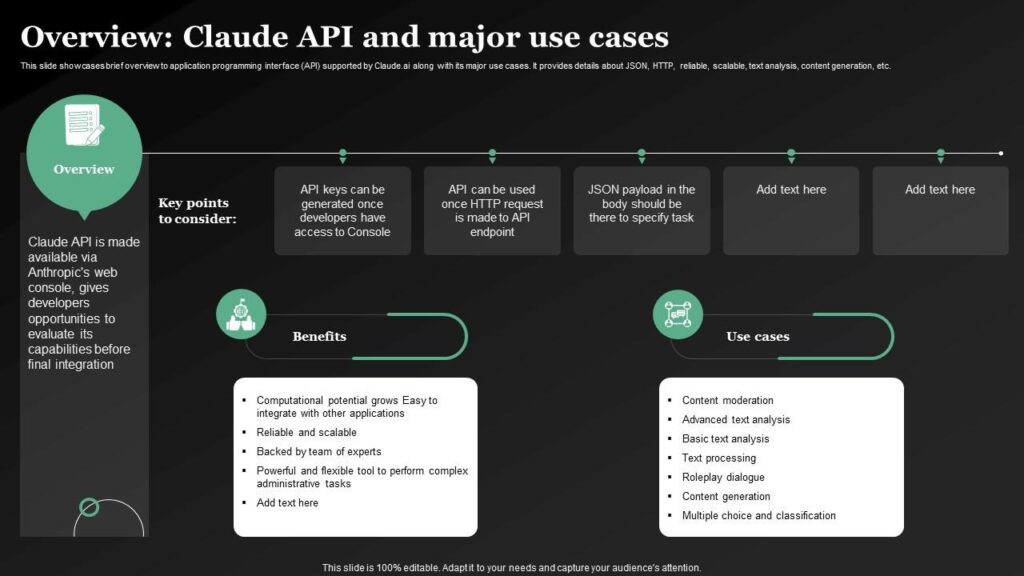
7. Claude — Best for Content-First Presentations
Claude is best known as an AI writing assistant, but it can also generate PowerPoint presentations from your content.
If your priority is accuracy, clarity, and structured information, Claude performs very well. You can upload your notes, documents, or research, and Claude turns them into a full PowerPoint deck.
This makes Claude especially useful for research presentations, educational content, and data-heavy reports.
Claude’s biggest strength is reliability. It is less likely to hallucinate or make up information compared to many other AI tools. The content is usually well-organized and easy to follow.
Where Claude falls behind is design.
The slides are clean but visually simple. You do not get modern layouts, advanced visuals, or strong branding. You usually need to polish the slides manually after generation. There is no way to iterate on existing presentations easily using Claude. As your content evolves, the layouts start breaking as the user is back to pixel tweaking in powerpoint.
Why Claude ranks #7
- Very accurate content
- Generates PowerPoint files
- Strong structure and clarity
- Reliable output
Best suited for
- Research presentations
- Educational decks
- Reports and documentation
- Data-driven content
Pros
- High content accuracy
- Clear slide structure
- Reliable information
- Easy PPT export
Cons
- Basic slide design
- No visual polish
- Requires manual design work
Verdict
Claude is a strong AI presentation maker for content-heavy presentations. If accuracy matters more than design, it is a good choice. For visually rich decks, it needs extra work.
Final Verdict: Which AI Presentation Maker Is Actually Worth Using?
AI presentation tools have become a normal part of modern work.
Founders use them for pitch decks.
Sales teams use them for client presentations.
Managers use them for strategy and planning.
Teachers use them for lessons.
But after testing many of these tools, one thing becomes very clear:
Not every AI presentation maker is built for real work.
Some tools look great in demos but break when you start editing.
Some create beautiful slides but give you very little control.
Some are accurate but look boring.
A good AI presentation maker is not just about speed.
It is about quality that lasts.
Your slides should still look clean after edits.
Your layout should not break when text changes.
Your deck should stay consistent when reused.
That is what really matters in professional presentations.
Best AI Presentation Makers by Use Case
Here is a simple breakdown based on real usage:
Best Overall AI Presentation Maker
Alai – Best for professional quality, flexibility, and long-term workflows
Best for Fast, Multiformat Slides
Gamma – Best for quick decks that may be used as webpages
Best for Business Teams
Beautiful.ai – Best for structured team presentations that have fixed layouts
Best option for Google users
Google Slides (Nano Banana) – Best to regenerate 1-2 slides in an existing Google slide presentation
Best for Office Users
PowerPoint with Copilot – Best for Microsoft workflows
Best for Designers & Beginners
Canva – Best for template library
Best for Content Accuracy
Claude – Best for research and data-heavy decks
Why Alai Stands Out from Other AI Presentation Makers
Most AI presentation tools are built to generate slides once.
Alai is built for people who create presentations again and again.
In real work:
- Slides change
- Content gets rewritten
- Sections move
- Decks get reused
Alai is designed for that reality.
It lets you explore different slide layouts before choosing one.
It keeps your design clean when content changes.
It understands your full presentation, not just one slide.
It lets you mix visual image slides with regular content slides.
Instead of forcing your ideas into templates, Alai adapts around your ideas.
That is why it fits professional standards better than most tools in this space.
Who Should Use an AI Presentation Maker?
AI presentation makers are useful for anyone who needs to explain ideas clearly.
They are especially helpful for:
- Founders creating pitch decks
- Sales teams preparing client presentations
- Marketing teams building storytelling decks
- Teachers making lesson slides
- Consultants presenting strategies
- Managers sharing business plans
If you spend time fixing spacing, fonts, and alignment, an AI presentation maker can save you hours.
What Really Matters When Choosing an AI Presentation Maker
Before choosing a tool, ask yourself:
Can I edit slides without breaking the layout?
Will my deck stay consistent over time?
Can I reuse and improve presentations easily?
Does the tool support real workflows?
A good AI presentation maker should feel reliable, not flashy.
It should help you focus on your message, not fight with design.
Final Thoughts
AI presentation makers are changing how people share ideas.
The future is not about making slides faster.
It is about making better presentations with less effort.
The best tools support your thinking. They do not replace it.
If you care about clarity, consistency, and professional quality, choose a tool that is built for real workflows — not just quick demos.
That is where modern AI presentation makers like Alai are setting the standard.
Common Questions About AI Presentation Makers
What is an AI presentation maker?
An AI presentation maker is a tool that turns your ideas, notes, or documents into a complete slide deck. It helps organize content, design layouts, and add visuals automatically.
Are AI presentation makers good for business presentations?
Yes, if the tool is built for professional use. The best tools support editing, revisions, and long-term reuse without breaking the design.
Can someone with no design skills make good presentations using AI?
Yes. That is the main benefit. The tool handles layout and design so you can focus on your content.
Can AI presentations be reused and updated?
They should be. Most professional presentations are reused. A strong AI presentation maker supports this without losing quality.
What is the biggest mistake people make when choosing an AI tool?
Choosing only based on speed.
Fast slides are useful, but you will get stuck at an 80% presentation with no way to iterate and get to that perfect presentation.
A tool that breaks during editing will waste more time than it saves.