Box Modeling in 3D Modeling: Building Strong 3D Assets from Simple Shapes

January 8, 2026
3 mins read

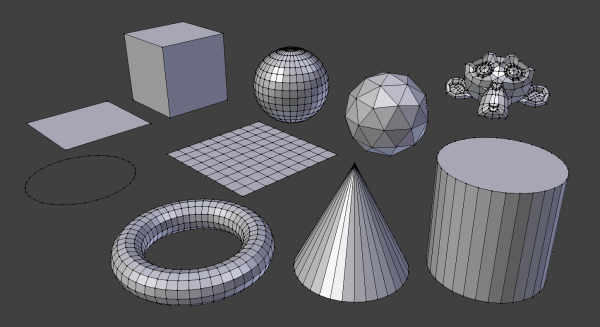
Box modeling in 3D modeling is a fundamental technique that helps artists create clean, efficient, and professional 3D assets. The method focuses on shaping a basic cube into complex forms through careful editing of polygons. Because it offers control, flexibility, and clarity, box modeling remains a core skill for beginners and experienced artists alike.

This technique supports a wide range of projects, from animated characters to game-ready props and industrial designs. Understanding box modeling helps artists build better models while avoiding common technical problems.

Understanding the Core Concept

Box modeling starts with a simple geometric object, usually a cube. Instead of adding pieces separately, the artist reshapes the cube by adjusting faces, edges, and vertices. Each change slowly transforms the basic shape into a recognizable form.

This approach allows the artist to see the full object from the start. As a result, proportions stay balanced and geometry stays organized. Box modeling encourages thoughtful planning and prevents unnecessary complexity early in the process.

Why Artists Choose Box Modeling

Many artists prefer box modeling in 3D modeling because it supports creative freedom without sacrificing structure.

The technique works well for both organic and hard-surface models. Artists can easily block out major forms before refining details. This makes it easier to fix mistakes and explore different designs.

Box modeling also produces clean topology. Clean geometry improves shading, animation, and rendering results. Models created with proper edge flow deform smoothly, especially in animated projects.

The Step-by-Step Process

The box modeling workflow begins with a low-polygon cube. The artist scales the cube to match the rough proportions of the object. At this stage, accuracy matters more than detail.

Next, the artist extrudes faces to create major features such as limbs, panels, or openings. Edge loops help define shape and structure. Each addition increases detail while maintaining control over geometry.

In the final stage, the artist refines the model by adjusting edge flow, smoothing surfaces, and correcting proportions. This gradual process keeps the model clean and flexible.

Using Box Modeling for Characters

Character creation often relies on box modeling in 3D modeling. Artists start with a simple body shape and extrude arms, legs, and the head from the base mesh. This method helps maintain symmetry and consistent proportions.

Clean topology becomes critical in character modeling because characters must bend and move. Proper edge loops around joints allow smooth animation. Box modeling makes it easier to plan these loops early in the process.

Applying Box Modeling to Hard-Surface Design

Hard-surface modeling also benefits from box modeling. Objects such as vehicles, tools, furniture, and machines often start as basic boxes. Artists then sharpen edges, add bevels, and cut details to achieve precise shapes.

This technique helps maintain straight lines and accurate angles. For game development and product visualization, box modeling ensures efficient geometry that performs well in real-time environments.

Common Errors and How to Avoid Them

Despite its simplicity, box modeling can lead to problems if artists ignore best practices.

One common error involves adding too many polygons too soon. High-density meshes slow down editing and make changes difficult. Artists should always begin with low-poly geometry.

Another issue involves poor edge flow. Random edges cause shading errors and animation problems. Artists should focus on quads and logical edge placement.

Failing to use reference images also limits accuracy. Real-world references help maintain realistic proportions and shapes.

Software That Supports Box Modeling

Most modern 3D applications support box modeling workflows.

Blender offers a powerful and free option with advanced modeling tools. Autodesk Maya provides industry-standard tools for animation and clean topology. 3ds Max remains popular for architectural and game assets. Cinema 4D appeals to motion designers due to its intuitive interface.

No matter the software, the principles of box modeling stay consistent.

Improving Your Box Modeling Skills

Artists can improve box modeling in 3D modeling through regular practice and discipline.

Focusing on silhouette helps create strong forms. A clear outline improves readability and realism.

Learning shortcuts and modeling tools increases efficiency. Faster workflows allow more time for refinement.

Studying topology and edge flow improves technical quality. Clean geometry leads to better results in every stage of production.

Box Modeling in Modern Production Pipelines

In professional workflows, artists often combine box modeling with digital sculpting. They build a clean base mesh using box modeling, then add high-resolution details through sculpting tools. Afterward, they refine topology for animation or rendering.

This workflow highlights the lasting importance of box modeling. Even with advanced tools available, strong base meshes remain essential.

Final Thoughts

Box modeling in 3D modeling remains one of the most valuable techniques for creating efficient and professional 3D assets. Its structured approach helps artists maintain control, produce clean geometry, and adapt to different project needs.

By mastering box modeling, artists build a strong foundation that supports every stage of the 3D creation process. Whether working on characters, props, or environments, box modeling continues to shape the future of digital design

Leave a Reply

Your email address will not be published.

Previous Story

 Cost of Carpet Cleaning Services in Thethe UK: What Carpet Bright UK Charges

Avoid Downtime with Reliable Cummins Marine Engines In the demanding world of commercial maritime operations, marine engines serve as the heartbeat of every vessel. When an engine fails, the consequences ripple far beyond the engine room—halted operations, missed delivery schedules, dissatisfied customers, and mounting financial losses become immediate realities. For commercial vessel operators, downtime isn't just an inconvenience; it's a direct threat to profitability and reputation. The challenge lies in finding a propulsion solution that delivers unwavering reliability even under the harshest marine conditions. Cummins marine engines have established themselves as the answer to this critical need, offering proven durability that keeps vessels operating when it matters most. With advanced engineering designed specifically for marine environments, superior fuel efficiency that reduces operational costs, and a global support network ensuring help is always within reach, Cummins engines provide commercial operators with the confidence to navigate any waters without fear of unexpected breakdowns compromising their business. Why Cummins Marine Engines Are the Gold Standard for Reliability Cummins has earned its reputation as a reliability benchmark in the marine industry through decades of proven performance across diverse maritime applications. Commercial operators from fishing fleets to cargo vessels consistently report uptimes exceeding 98%, a testament to engineering that prioritizes durability above all else. The foundation of this reliability starts with heavy-duty cast iron construction that withstands constant vibration and thermal stress inherent to marine environments. Advanced cooling systems featuring saltwater-resistant heat exchangers maintain optimal operating temperatures even during extended high-load operations, preventing the overheating issues that plague lesser engines. Unlike competitors who adapt automotive or industrial engines for marine use, Cummins designs purpose-built marine powerplants from the ground up, accounting for corrosion resistance, moisture exposure, and the unique load profiles of vessel propulsion. A Pacific Northwest fishing operator reported running a Cummins QSB6.7 for over 15,000 hours across three seasons without a single unscheduled shutdown, while a Caribbean charter company documented five years of continuous operation with only routine maintenance intervals. Independent reliability studies consistently place Cummins engines at the top for mean time between failures, often outlasting competitors by 30-40% in equivalent operating conditions. The difference becomes most apparent during critical operations—when weather windows close quickly or delivery deadlines loom, Cummins engines deliver the dependability that separates profitable ventures from costly failures. Optimizing Performance for Maximum Operational Efficiency Performance optimization directly impacts a commercial vessel's bottom line through reduced fuel consumption, extended component life, and increased operational capacity. The difference between a properly optimized engine and one running below peak efficiency can translate to thousands of dollars monthly in unnecessary fuel costs and premature repairs. Cummins marine engines incorporate electronic control modules that continuously adjust fuel delivery, timing, and boost pressure to maintain optimal combustion efficiency across varying load conditions, but realizing their full potential requires operator diligence. Establishing rigorous maintenance schedules forms the foundation of performance optimization—oil analysis every 250 hours reveals developing issues before they impact efficiency, while fuel filter replacements at manufacturer-specified intervals prevent injector fouling that reduces power output by up to 15%. Fuel quality management proves equally critical, as contaminated or low-grade diesel creates deposits that compromise combustion chamber efficiency and accelerate wear on precision components. Key Benefits of Choosing Cummins Marine Diesel Engines Selecting Cummins marine diesel engines delivers tangible advantages that directly impact operational profitability and regulatory compliance. Fuel efficiency stands as perhaps the most immediately noticeable benefit, with modern Cummins engines consuming 8-15% less fuel than comparable powerplants through advanced high-pressure common rail injection systems that optimize combustion. For a commercial vessel burning 50 gallons daily, this efficiency translates to savings exceeding $15,000 annually at current diesel prices. The power-to-weight ratio of Cummins engines provides exceptional thrust without sacrificing deck space or payload capacity, with compact designs delivering up to 600 horsepower from units weighing substantially less than competitors. Environmental compliance has become non-negotiable in modern maritime operations, and Cummins engines meet IMO Tier III and EPA standards through selective catalytic reduction technology that reduces nitrogen oxide emissions by 75% while maintaining performance. This compliance protects operators from escalating fines and port access restrictions that increasingly target non-compliant vessels. The global service network supporting Cummins engines eliminates the anxiety of breakdowns in remote locations—over 8,000 authorized service points span six continents, ensuring critical parts and qualified technicians remain accessible whether operating in Alaskan waters or the Mediterranean. Parts availability particularly distinguishes Cummins from boutique manufacturers, with common components stocked at distributors worldwide and expedited shipping delivering specialized parts within 48 hours to most commercial ports. This comprehensive support infrastructure transforms potential multi-week repair delays into manageable interruptions, preserving revenue streams and customer commitments that define successful maritime enterprises. Best Practices for Maintaining Your Cummins Marine Engine Establishing a systematic maintenance routine prevents the majority of engine failures that cause costly downtime in commercial operations. Daily checks should begin with visual inspections of the engine compartment for fluid leaks, loose connections, or unusual debris accumulation, followed by verifying coolant and oil levels before starting operations. During startup, operators should monitor for abnormal sounds, excessive smoke, or irregular idling that signal developing problems. Weekly maintenance expands to include checking belt tension and condition, inspecting fuel filters for water contamination, testing battery voltage and connections, and examining exhaust system components for corrosion or loose fittings. Monthly tasks require more detailed attention—changing engine oil and filters according to operating hours rather than calendar dates, inspecting raw water impellers for wear or damage, testing coolant concentration and pH levels, and examining hose clamps and connections throughout cooling and fuel systems. Common issues like overheating typically stem from restricted raw water flow caused by clogged strainers or failing impellers, preventable through monthly impeller inspections and keeping spare impellers onboard. Hard starting often indicates fuel system air leaks or contaminated filters, resolved by systematically checking fuel line connections and replacing filters at 250-hour intervals regardless of apparent condition. Professional servicing becomes essential at 500-hour intervals when valve adjustments, injector testing, and turbocharger inspections require specialized tools and expertise that exceed typical crew capabilities. Cummins INSITE diagnostic software should be connected quarterly to download fault codes and performance data, revealing trends invisible during routine operation. Many operators also consult with diesel engine specialists like GRT who provide comprehensive maintenance support and technical expertise for commercial marine applications. Maintaining detailed service logs documenting every maintenance task, operating hours, fuel consumption, and performance observations creates invaluable diagnostic history that helps technicians quickly identify patterns when issues arise, transforming maintenance from reactive repairs into proactive protection against downtime. Invest in Proven Marine Propulsion Reliability Reliability in marine propulsion separates thriving commercial operations from those constantly battling costly interruptions and lost revenue. Cummins marine engines deliver the uncompromising dependability that modern vessel operators require, combining purpose-built durability with fuel efficiency that directly improves profitability. The advanced engineering behind every Cummins powerplant—from corrosion-resistant construction to intelligent electronic controls—ensures vessels remain operational through demanding conditions that sideline lesser engines. Environmental compliance, exceptional power-to-weight ratios, and fuel savings reaching 15% provide immediate operational advantages, while the extensive global service network transforms potential disasters into manageable maintenance events. For commercial operators whose livelihoods depend on vessels that perform without fail, choosing Cummins means choosing confidence over uncertainty. The proven track record across fishing fleets, cargo vessels, and charter operations worldwide demonstrates that reliability isn't just a marketing claim—it's a measurable reality reflected in superior uptimes and lower total ownership costs. Whether upgrading aging powerplants or specifying engines for new construction, commercial vessel operators owe it to their business to experience the Cummins difference. Contact an authorized Cummins marine dealer today to discuss how the right engine solution can eliminate downtime concerns and position your operation for sustained success on the water.
Next Story

Avoid Downtime with Reliable Cummins Marine Engines

Previous Story

 Cost of Carpet Cleaning Services in Thethe UK: What Carpet Bright UK Charges

Avoid Downtime with Reliable Cummins Marine Engines In the demanding world of commercial maritime operations, marine engines serve as the heartbeat of every vessel. When an engine fails, the consequences ripple far beyond the engine room—halted operations, missed delivery schedules, dissatisfied customers, and mounting financial losses become immediate realities. For commercial vessel operators, downtime isn't just an inconvenience; it's a direct threat to profitability and reputation. The challenge lies in finding a propulsion solution that delivers unwavering reliability even under the harshest marine conditions. Cummins marine engines have established themselves as the answer to this critical need, offering proven durability that keeps vessels operating when it matters most. With advanced engineering designed specifically for marine environments, superior fuel efficiency that reduces operational costs, and a global support network ensuring help is always within reach, Cummins engines provide commercial operators with the confidence to navigate any waters without fear of unexpected breakdowns compromising their business. Why Cummins Marine Engines Are the Gold Standard for Reliability Cummins has earned its reputation as a reliability benchmark in the marine industry through decades of proven performance across diverse maritime applications. Commercial operators from fishing fleets to cargo vessels consistently report uptimes exceeding 98%, a testament to engineering that prioritizes durability above all else. The foundation of this reliability starts with heavy-duty cast iron construction that withstands constant vibration and thermal stress inherent to marine environments. Advanced cooling systems featuring saltwater-resistant heat exchangers maintain optimal operating temperatures even during extended high-load operations, preventing the overheating issues that plague lesser engines. Unlike competitors who adapt automotive or industrial engines for marine use, Cummins designs purpose-built marine powerplants from the ground up, accounting for corrosion resistance, moisture exposure, and the unique load profiles of vessel propulsion. A Pacific Northwest fishing operator reported running a Cummins QSB6.7 for over 15,000 hours across three seasons without a single unscheduled shutdown, while a Caribbean charter company documented five years of continuous operation with only routine maintenance intervals. Independent reliability studies consistently place Cummins engines at the top for mean time between failures, often outlasting competitors by 30-40% in equivalent operating conditions. The difference becomes most apparent during critical operations—when weather windows close quickly or delivery deadlines loom, Cummins engines deliver the dependability that separates profitable ventures from costly failures. Optimizing Performance for Maximum Operational Efficiency Performance optimization directly impacts a commercial vessel's bottom line through reduced fuel consumption, extended component life, and increased operational capacity. The difference between a properly optimized engine and one running below peak efficiency can translate to thousands of dollars monthly in unnecessary fuel costs and premature repairs. Cummins marine engines incorporate electronic control modules that continuously adjust fuel delivery, timing, and boost pressure to maintain optimal combustion efficiency across varying load conditions, but realizing their full potential requires operator diligence. Establishing rigorous maintenance schedules forms the foundation of performance optimization—oil analysis every 250 hours reveals developing issues before they impact efficiency, while fuel filter replacements at manufacturer-specified intervals prevent injector fouling that reduces power output by up to 15%. Fuel quality management proves equally critical, as contaminated or low-grade diesel creates deposits that compromise combustion chamber efficiency and accelerate wear on precision components. Key Benefits of Choosing Cummins Marine Diesel Engines Selecting Cummins marine diesel engines delivers tangible advantages that directly impact operational profitability and regulatory compliance. Fuel efficiency stands as perhaps the most immediately noticeable benefit, with modern Cummins engines consuming 8-15% less fuel than comparable powerplants through advanced high-pressure common rail injection systems that optimize combustion. For a commercial vessel burning 50 gallons daily, this efficiency translates to savings exceeding $15,000 annually at current diesel prices. The power-to-weight ratio of Cummins engines provides exceptional thrust without sacrificing deck space or payload capacity, with compact designs delivering up to 600 horsepower from units weighing substantially less than competitors. Environmental compliance has become non-negotiable in modern maritime operations, and Cummins engines meet IMO Tier III and EPA standards through selective catalytic reduction technology that reduces nitrogen oxide emissions by 75% while maintaining performance. This compliance protects operators from escalating fines and port access restrictions that increasingly target non-compliant vessels. The global service network supporting Cummins engines eliminates the anxiety of breakdowns in remote locations—over 8,000 authorized service points span six continents, ensuring critical parts and qualified technicians remain accessible whether operating in Alaskan waters or the Mediterranean. Parts availability particularly distinguishes Cummins from boutique manufacturers, with common components stocked at distributors worldwide and expedited shipping delivering specialized parts within 48 hours to most commercial ports. This comprehensive support infrastructure transforms potential multi-week repair delays into manageable interruptions, preserving revenue streams and customer commitments that define successful maritime enterprises. Best Practices for Maintaining Your Cummins Marine Engine Establishing a systematic maintenance routine prevents the majority of engine failures that cause costly downtime in commercial operations. Daily checks should begin with visual inspections of the engine compartment for fluid leaks, loose connections, or unusual debris accumulation, followed by verifying coolant and oil levels before starting operations. During startup, operators should monitor for abnormal sounds, excessive smoke, or irregular idling that signal developing problems. Weekly maintenance expands to include checking belt tension and condition, inspecting fuel filters for water contamination, testing battery voltage and connections, and examining exhaust system components for corrosion or loose fittings. Monthly tasks require more detailed attention—changing engine oil and filters according to operating hours rather than calendar dates, inspecting raw water impellers for wear or damage, testing coolant concentration and pH levels, and examining hose clamps and connections throughout cooling and fuel systems. Common issues like overheating typically stem from restricted raw water flow caused by clogged strainers or failing impellers, preventable through monthly impeller inspections and keeping spare impellers onboard. Hard starting often indicates fuel system air leaks or contaminated filters, resolved by systematically checking fuel line connections and replacing filters at 250-hour intervals regardless of apparent condition. Professional servicing becomes essential at 500-hour intervals when valve adjustments, injector testing, and turbocharger inspections require specialized tools and expertise that exceed typical crew capabilities. Cummins INSITE diagnostic software should be connected quarterly to download fault codes and performance data, revealing trends invisible during routine operation. Many operators also consult with diesel engine specialists like GRT who provide comprehensive maintenance support and technical expertise for commercial marine applications. Maintaining detailed service logs documenting every maintenance task, operating hours, fuel consumption, and performance observations creates invaluable diagnostic history that helps technicians quickly identify patterns when issues arise, transforming maintenance from reactive repairs into proactive protection against downtime. Invest in Proven Marine Propulsion Reliability Reliability in marine propulsion separates thriving commercial operations from those constantly battling costly interruptions and lost revenue. Cummins marine engines deliver the uncompromising dependability that modern vessel operators require, combining purpose-built durability with fuel efficiency that directly improves profitability. The advanced engineering behind every Cummins powerplant—from corrosion-resistant construction to intelligent electronic controls—ensures vessels remain operational through demanding conditions that sideline lesser engines. Environmental compliance, exceptional power-to-weight ratios, and fuel savings reaching 15% provide immediate operational advantages, while the extensive global service network transforms potential disasters into manageable maintenance events. For commercial operators whose livelihoods depend on vessels that perform without fail, choosing Cummins means choosing confidence over uncertainty. The proven track record across fishing fleets, cargo vessels, and charter operations worldwide demonstrates that reliability isn't just a marketing claim—it's a measurable reality reflected in superior uptimes and lower total ownership costs. Whether upgrading aging powerplants or specifying engines for new construction, commercial vessel operators owe it to their business to experience the Cummins difference. Contact an authorized Cummins marine dealer today to discuss how the right engine solution can eliminate downtime concerns and position your operation for sustained success on the water.
Next Story

Avoid Downtime with Reliable Cummins Marine Engines

Latest from Blog

Go toTop