Khizar Seo
1. I Wasn’t Looking For The “Best” AI Humanizer
By 2026, I don’t believe the word free in this category.
In the AI humanizer world, “free” usually means one of three things:
● you get a grainy sample and hit a wall
● you get a “free trial,” which quietly demands your credit card
● it’s technically free, but so limited you can’t use it on anything that looks like real writing
And that’s the thing most reviews miss. The real issue isn’t whether a tool can produce one decent rewrite. It’s whether it allows you to keep going, without timers, “upgrade now” prompts, hidden friction that stalls your flow or one annoying thing after another that stops you in your tracks.
So that’s what I tested.
Not “Which tool is the strongest?”
But: Which tool is functionally free in real use?
2. What I Mean by “True Free Use”
Before naming a single tool, I have to establish what I mean by “true free AI humanizer” in my usage because pricing pages can say a lot of things.
For me, true free humanizer means:
● I can use it right now, no credit card.
● I don’t get blocked when I try to use it long-term.
● I have enough time to put in enough real text to reasonably judge the output.
● The tool does not constantly want to convert me into an purchased subscriber.
If I can paste in a paragraph, see how it goes, and then be put into a checkout flow, that’s not free. That’s a demo.
And there’s one more boundary: I’m not treating these tools as “cheat buttons.” If they’re your trying to blow the whistle of work you didn’t do, that’s a different conversation with different stakes. My test was about making drafts cleaner, including the flat, even “AI tone,” polishing cadence, and making paragraphs feel like they were written by someone with a voice.
3. How I Tested These Tools (What I Did, and What I Ignored)
I used these tools the way I actually edit:
I took drafts that were already logically fine, but had obvious “AI shape.” Things like:
● introductions that take too long to say anything,
● paragraphs with perfectly even sentence length,
● transitions that feel polite but empty,
● list-heavy sections where formatting matters.
I ran each tool on the same set of sections and asked two simple questions:
1) Would I keep this paragraph as-is in a real draft?
If I still wanted to rewrite it myself immediately, it wasn’t good enough—detector score or not.
2) Did it reduce the obvious “AI signals” a human reader notices?
Not magic, not perfection, just: did the writing stop feeling uniform and templated?I did sanity-check some outputs with common detectors as a point of reference, but I didn’t treat those scores as proof. Detectors shift. My eyes (and the final reader) are still the real judge.
One sentence that sums up the whole approach:
I treated these tools as editing passes, not one-click rewrite buttons.
4. The Three Tools That Let Me Keep Working
I’m not ranking these as “best to worst.” I’m describing what free use feels like with each one, because that’s what matters if you’re actually trying to write.
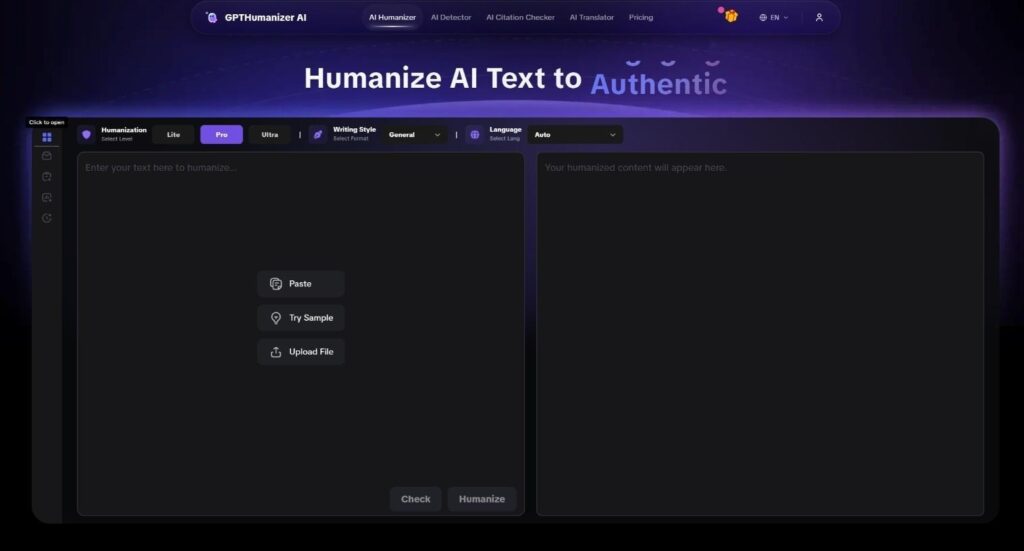
1) GPTHumanizer AI: The One That Felt Functionally Free
I wasn’t even looking at out quality first. I was looking for friction.
I went to GPTHumanizer AI in a fresh browser session and scanned for the usual friction: signup guards, email walls, credit card prompts masquerading as “free trials,” or counters that start counting down the moment you’re comfortable.
None of that showed up.
I paste something in and I send it off. I close the tab, come back, paste it in again. No timed pressure. No “you’ve got 2 rewrites left” or no sudden downgrade that tries to scare you into as if-you-need-it-you-require-product-start-up. In practice, it’s free.
Now, about the writing.
What I noticed most consistently wasn’t some dramatic punch-up. It was a quieter form of progress that’s more valuable on a real draft:
● Openings got tighter. The paragraph reached the point faster.
● Sentence rhythm broke up. The text stopped feeling “even.”
● Transitions became less template-driven. The writing felt less like it was following a politeness script.
It did avoid that kind of “obvious trickery” that makes you look suspicious in a different way – weird punctuation, unnatural word choice, or a synonym swap that makes it feel like a literal translation.
That said, this is not a perfect tool, and it does have an actual downside you notice if you’re working on longer content:
The Lite model’s 200 words per request chunking is a real workflow tax.
You’re going to have to split up a 2,000-3,000 word document into pieces. It’s not hard, but it’s not nothing. And you’ll have to consider continuity: when you humanize in chunks, there is sometimes a quick read-through you do afterwards to make sure the voice doesn’t shift between paragraphs.
There is also an actual limitation to the free offering: the free output is “safe.” It can make cadence smoother, and remove obvious AI quirks, but it won’t always give you a strong, deeply personalized voice shift in one rewrite. Sometimes you’ll need a second rewrite or a quick edit to fine-tune it.
My verdict: GPTHumanizer AI seemed like something I was actually going to use as part of a real editing workflow. It doesn’t pretend to be a one-click long-document fix-all, but in the way you can polish and shape the body of a paragraph, it’s the closest thing I’ve seen to “functionally free.”
2) StealthWriter: Too Powerful, but Free Use is Conditional
There are plenty of StealthWriter fans. They say one of the big selling points is your control.
That’s true. In theory. Strength levels. Aggressiveness levels. Play with the wheels til it’s about exactly what you want.
In practice, that means you’re playing the friction game. Especially again if you have a draft to finish and not to run experiments.
The experience is “usable” for free experience. But it never fades into the background the way the best tools do. You typically sense any limitations. And you sometimes feel the product trying to push you towards “more powerful” mode. Even with a big daily allowance, it still psychologically wasn’t “I can normally just identify materials like I want.”
In terms of quality (again, based on my experience), there was a higher variance than GPTHumanizer.
There were some incredibly strong rewrites. Stronger human texture, less mechanical rhythm, better phrasing. But when it didn’t work, it cost time, too. Once or twice, it came out of scale to the point it sounded like it was rewritten or Un-Romanized.
When it comes to something so customizable, you’re not just rewriting text, you’re rewriting settings.
The curtain rises (and falls) on StealthWriter for those who like the tuning of parameters and the writing is on small chunks. For those who want a reasonable “polish” from an editor and are in a rush, the inconsistency can be a problem.
My verdict: it’s a powerful tool, but the free experience still feels conditional. Not the kind of free that fades away.
3) Clever AI Humanizer: Free in Theory, Fragile in Practice
Clever AI is one of those tools that you find everywhere because it’s just so convenient to use (and at least during my research, it didn’t shoot straight a hard paywall in your face).
And that matters. In the most literal ways, it gets past the “can I keep on working?” barrier better than a lot of the faked out free tools.
But it showed its weakness where true writing happens: structure, formatting, and overall voice continuity.
I fed it parts that had pretty much obvious formatting, and especially list-heavy content, and it was output that would, more often than not than I desired, flatten that structure. My bullets would stop being a bullet point. The output was still readable however, but it hadn’t aged the shape of the draft I was working on.
Also, a lot of the writing was “slightly choppy” in certain areas. Not busted or nonsense, just like a not-too-bad translation: meaning was preserved but the rhythm was slightly off. That’s the thing you only notice when you’re actually publishing, because you’re creating the very thing you just tried to get rid of: “this paragraph just wasn’t written by a person with the same voice.”
The hard part is that Clever AI isn’t “bad.” It’s just showing a lack of consistency in the areas you care about the most.
If you’re taking a big chunk of text in, and you don’t mind doing a long post-pass, then it can be handy. But if you want to “rewrite, and move on,” it’s a little more fragile than it seems.
My verdict: Clever AI is a better pass on the “free access” test than a lot of tools, but it fails too often on the “top-grader material” test when it comes to structure and voice.
5. What “True Free” Actually Means After Using These Three
After testing these back to back, I ended up with a different definition of “best free.”
It’s not about who lets you paste the most words at once.
It’s about who lets you stay in flow.
A tool can be “free” on paper and still be unusable because it interrupts you, flattens your structure, or forces you to repair the output so much that you lose the time you were trying to save.
In real writing, the most valuable tools behave like quiet editors:
● They tighten openings.
● They vary rhythm.
● They reduce templated transitions.
● They preserve meaning and structure without “obvious tricks.”And here’s the part people avoid saying:
Detectors aren’t the finish line.
Readability is.A human reader (or an editor, or a client) will notice stiffness, repetition, and uniform cadence long before an algorithm becomes your real problem.
6. Final Thoughts: Who These Tools Are (and Aren’t) For
If you’re on a zero budget and you need something you can actually rely on without trials or paywalls, GPTHumanizer AI is the closest thing to “real free use” in this set—especially for paragraph-by-paragraph editing. Just accept the chunking limit and plan a quick final continuity pass.
If you like experimenting and you want control, StealthWriter can be worth it, but understand the trade: you may spend time tuning settings, and results can vary.
If you need bulk access and you’re okay doing more cleanup afterward, Clever AI Humanizer can work, but it’s fragile when formatting and voice consistency matter.
And the boundary I’ll repeat, because it matters: if you’re expecting to paste a 3,000-word document and walk away with a perfect “human” draft, you’re not looking for “free.” You’re looking for a different category of tool, and you’ll still need human judgment at the end.
Free works best when you treat it as part of the writing process, not a shortcut around it.